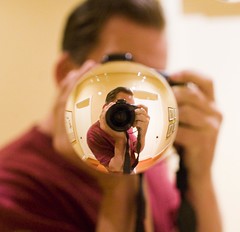
Kelly Castro’s Portarit of Me: TH 99

TH99

A few weeks back when I was down visiting with Adobe’s Lightroom Team, I had an opportunity to stop by and spend some time with Kelly Castro, an amazing photographer who I’ve long admired who works on the team. Kelly took the above portrait of me while I was down there as part of his Exteriors series. It was a honor to be photographed by someone with Kelly’s creativity and talent. Thanks Kelly for including me in this fantastic series. You can see more of Kelly’s work on Flickr here.

Watch the Photograpy Documentary “William Eggleston In the Real World” for Free

Watch more free documentaries

Thanks to APhotoEditor for the heads up on a free online version of the William Eggleston documentary “William Eggleston in the Real World.” I watched this documentary earlier this year on Netflix’s Watch Now service and would highly recommend it to anyone who considers him or herself a student of fine art photography.

William Eggleston has had a huge influence for me personally. He is also, perhaps more than any other photographer, responsible for the acceptance of a Democratized photography aesthetic in the fine art world today — a world where anything and everything around you can take on meaning, and an acceptance of the snapshot as fine art. It’s interesting in the documentary hearing about how Eggleston used to go to the drug store to watch the printing machine print out other people’s snapshots in order to better understand that form and format.

Eggleston was also a pioneer of color photography, who along with others like Stephen Shore, really paved the way for color photography as a viable form of fine art photography. Eggleston was the first photographer to ever have a color photography solo show at NY’s MOMA museum back in 1976.

You can find William Eggleston’s main presence on the internet today at his website here. I’d also highly recommend the most recent book on Eggleston’s photography, William Eggleston: Democratic Camera, Photographs and Video, 1961-2008. I purchased this book myself earlier this year and it is a great collection of Eggleston images and a great overview of his body of work.

Anyways, enjoy the documentary. There are some great scenes in this one, including one where he is told that he can’t film in a supermarket. There’s lots of one on one coverage of Eggleston out, camera to his face, shooting as he does in his own way of presenting the world.

Spending an Afternoon With Adobe’s Lightroom Team

Reinventing Popular Photography

On Monday May 18, I spent the afternoon and early evening down meeting with the Lightroom team at Adobe’s headquarters in San Jose California. At present there are about 30 individuals directly related to the production of Lightroom, the software that I use to process my images (you can see many of their names on the splash screen for the product when Lightroom loads). There are many additional people beyond the 30 that contribute to the product in some way, shape or form and you can click on full credits to see an even larger list of names. Most of the team lives and works in Minnesota with about 30% at the offices at Adobe’s headquarters in San Jose. The following article is based on my visit.

Tom Hogarty is the Senior Product Manager for Adobe’s popular Lightroom imaging software. A proud new father and photography enthusiast, Hogarty started working for Adobe back in July of 2005. Prior to joining Adobe he worked as a consultant in New York City helping professional photographers make the big leap from film photography to a digital workflow. Like most of the people I met at Adobe Tom was as passionate about photography as he was about working for Adobe.

“Is that the 50mm f/1.2,” Hogarty asked me as I arrived and we sat down, immediately wanting to look through my camera bag. “How do you like it,” he asked. Later on another Adobe employee told me that he had been using Adobe’s staff Canon 50mm f/1.2 — that was until Tom’s wife had her baby and now Tom had it. Of course baby pictures of your first born child might trump other photography, so that’s certainly understandable.

As we made the rounds visiting with various members of the Lightroom team I was struck by how much beautiful and amazing photography was on the walls everywhere we went. It seemed like everyone on the team was a photographer. The photography on the walls that we walked by was done by various team members Hogarty told me. Explaining that the team had recently had a contest where employees could submit photos and the results were what we saw on the walls around us. Individual offices were full of amazing artwork as well.

The first thing I noticed when visiting with Adobe Sr. Director of Engineering Winston Hendrickson was (i am not a) photographer Merkley’s book 111 on the shelf behind him. Hendrickson also had fantastic nature photography of his own on his walls along with large photos of his daughter playing softball.

Interestingly enough, when I told my pal Merkley, a former painter, after my visit that I noticed his art book down there at the Adobe offices, he could not have gushed more about the team. Merkley’s own art is much more than photography, it is largely based in digital imaging as much as anything.

“I can’t even imagine going back to painting now, said Merkley. “I could never organize my brushes the way Adobe has. Everything is always in the right spot where i can find it. If they can figure out a way to implement keystroke shortcuts for every day life I might revisit painting. I always extol the magic of Photoshop. the people who created it have no bigger fans on the planet than yours truly.”

“I’d give them all a kiss on the lips if i could,” added Merkley.

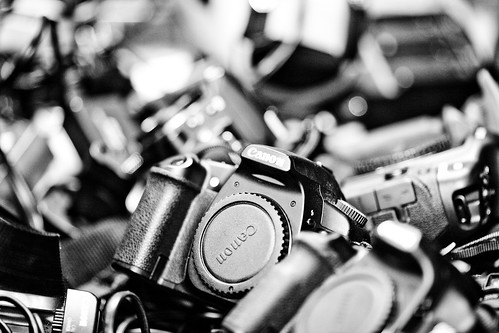
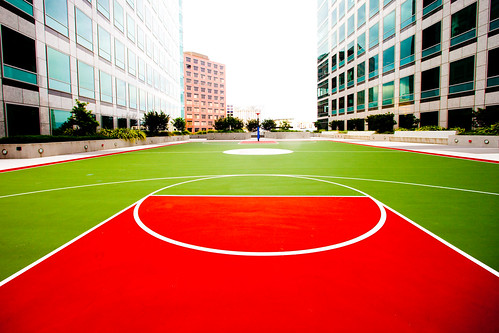
Tom Hogarty-2Drawyer Full of CanonsBasketball in the SkyDown Left Right, Plate 2
photos, clockwise starting upper left: Tom Hogarty, Adobe Lightroom’s Senior Product Manager, Drawer full of Canon camera bodies that Adobe uses for testing, Adobe’s San Jose headquarters at dusk, and Adobe HQ basketball court in the sky.

When I visited with Adriana Ohlmeyer (who was testing Lightroom support for the new Canon Rebel T1i which will be out shortly), I noticed the fantastic paintings in her office. She told me that they were done by a co-worker of hers. He thought that they looked great in her office so he let her have them. All around the offices you can’t help but notice how personally important photography, and more specifically fine art photography, seems to be to the various team members working on the software that has taken digital photography to a new level for artists and everyday photographers alike.

Part of supporting all of the cameras that Adobe does means having all of those cameras on hand to constantly test and refine. Ohlmeyer and Hogarty took me to a room at Adobe which would be a dream room for any digital photographer gearhead. Unlocking one drawer, Ohlmeyer pulled out a large oversize file cabinet drawer full of Canon camera bodies, another full of various Nikon bodies. Another cabinet was stocked full of Canon (yes, L series too) and Nikon lenses. While another whole cabinet was dedicated to many other camera manufacturers. Sony, Olympus, Fuji, they were all there. It’s easy to see how the Lightroom team would be so excited about photography having such a great line up of equipment constantly at their disposal.

But writing great software is more than just about a love for photography and cameras. It’s about paving the way to make the digital photography of the future even better and better, and at present Adobe seems to be leading this charge more than any other company both in terms of technology and market share. While Adobe doesn’t publicly release the number of copies of Lightroom or Photoshop that they have shipped to date, there is some data out which points to their dominance in this market — especially in the pro market.

Adobe’s John Nack recently blogged about research out based on North American pro photographers usage of Adobe’s imaging products vs. perhaps their largest rival Apple’s Aperture product. On all computers Adobe products dominated that market. Even specifically on Macs alone, Adobe’s Lightroom product still appeared to outsell Apple’s own Aperture product by more than 3 to 1 margin, and that’s not even counting their other camera RAW products like Photoshop.

Hogarty took me down to the Adobe labs area (one of the areas that I couldn’t photograph) to show me some of the new research that was presently going into the Lightroom product. While what I saw down there was off the record, I will say that Adobe is constantly working to refine their products and make Lightroom better and better and consistently more and more reliable with all of the camera gear on the market today. Part of that involves constantly testing all of the equipment out there.

While visiting the lab, Hogarty talked about another technology that he was excited about. Adobe’s DNG file format, A royalty free RAW image format that Adobe created in 2004.

While each camera manufacturer has their own proprietary RAW format, Adobe wanted to make a free format for everyone that could become a RAW standard. Adobe offers a free conversion program for people to convert their RAW images from whatever RAW format that they are using today to DNG. The advantages of DNG are not only that the file sizes are smaller, but that Hogarty said he felt that the format has a better chance of being around in the long term as an archive format 10, 20, 30 years down the road.

The DNG format also allows the metadata associated with your images to be included in the file itself, rather than as a sidecar file attached to your existing RAW file. I have to say that although I currently don’t convert my RAW files from Canon’s CR2 to DNG, Hogarty makes a compelling argument for the Adobe technology. Especially with images sizes getting larger and larger (on my 21 megapixel Canon 5D mark 2 for instance) having smaller RAW files when multiplying the files times thousands begins to make sense. It’s something I’m going to look into.

Designing great products for Adobe is part of what the Lightroom team does, but getting the message out about their software is important as well. Hogarty told me that recently a number of the team members had joined Twitter (I gave him my own personal pitch for FriendFeed as well and hopefully well see some Lightroom team members there soon too). These are definitely some of the people that you should consider following if you are interested in the Lightroom product. You can check out a list of the Lightroom team members that are currently tweeting away here.

Anne YehGo Green For Better Photographic Opportunities, Plate 2Melissa Monroe Itamura
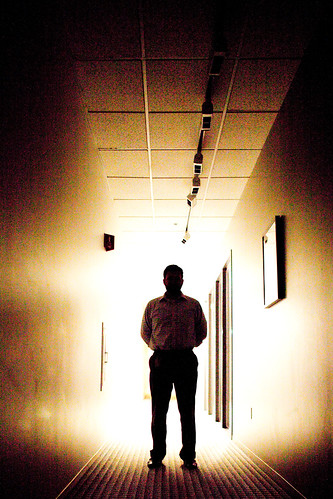
Photo’s l to r: A&R Edelman’s Anne Yeh, silhouette shot of Adobe’s Tom Hogarty down one of their dimmed “green” building hallways, and Adobe’s Melissa Monroe Itamura.

Also part of getting the word out is the responsibility of Adobe’s Lightroom Digital Imaging Evangelist Julieanne Kost. Over the past 10 years, Kost has spoken at hundreds of industry events around the world talking about Adobe products. In addition to live events she is also active with her own website at jkost.com and on her blog. She’s also frequently on AdobeTV.

As a company evangelist, I asked Kost what the most rewarding part of her job was.

“Sometimes it’s when I watch someone nod slightly in the audience, and I know that they just ‘got it,’ said Kost. Other times it’s when someone comes up to me after a presentation and exclaims how they will now be more efficient/productive because of Photoshop and Lightroom and, as a result, they will be more successful — personally, financially or however they define success.”

“But the biggest reward is when you see someone using the tools that Adobe makes, and that I speak about, to create images that allow them to communicate and express themselves in exactly the way they intended. If I can play even the smallest role in helping with that process, then it makes all of the travel and late nights completely worthwhile.”

Kelly Castro is another Adobe employee who finds working on Adobe products rewarding because of what it makes possible for serious photographers today. And Castro personally is one of the most serious fine art photographers around. Castro is presently working on a book of amazing black and white portraits for a series he calls “exeriors,” and is also very active on Flickr publishing under kelco . He’s been a longtime Flickr contact of mine, well before I’d ever even heard of Lightroom. Castro works as a Lightroom Quality Engineer, mostly working on the part of Lightroom that probably matters to my own production more than any other, the develop and export modules.

I asked Castro what he liked most about working on Lightroom.

“There are many things I like about working on Lightroom,” said Castro. “But probably the main thing is being involved in the development of what I feel is the best overall photographic workflow application available today. Many of the people on the team are serious photographers, and we are all completely invested in creating the greatest and most bullet-proof application possible — because we use it ourselves on a daily basis, in and outside of work.” Castro’s office also was pretty much a dream setup. Multiple computers (Macs and PCs) and huge oversize monitors. Check it out here.

All in all my vist to Adobe was a fantastic opportunity to meet so many of the team on a one on one face to face basis. I really appreciate having the opportunity to visit their offices and visit with their team. I also want to thank Anne Yeh over at Edelman for helping me provide access to the team and who made my visit with Adobe possible.

I put together a set of about 45 images from my visit at Adobe that you can check out here. One thing I especially liked about their offices were that they are now certified green. What this meant practically speaking for my visit, was that I was able to find lots of super cool long hallways where the lights were dimmed to save energy where I could shoot interesting silhouette shots, like the one above. Their basketball court in the sky was super fun to shoot as well. Adobe’s offices were a great place to shoot and I’m looking forward to getting back down there again in the future to shoot and write more about the important work that they are doing.

Why I Mark Off the Canon Logos on My Camera Gear

I had a few questions regarding why I mark off the Canon logos on my camera gear based on the video I posted earlier today with Marc Silber. I thought I’d explain that here in a new post.

In 2007 I had the tremendous honor of having my portrait taken by photographer Bill Wadman as part of his 365 Portraits series. Bill’s project involved shooting and posting in the same day a different portrait every day for an entire year. Bill is one of the best portrait photographers working in the business today, and in addition to my shot (which is probably my most favorite shot anyone’s ever taken of me) Bill shot a number of amazing people, including folks like astronaut Buzz Aldrin and CNN commentator Tucker Carlson. If you missed this series back in 2007 you should definitely check it out for some truly inspirational portrait work.

Anyways, when I met Bill I noticed that he had all the Canon logos on his gear taped off with black tape. I asked Bill why he did that and he said for two reasons, 1. Because he wanted to make his camera gear look less expensive (and hopefully less interesting to steal) and 2. Because, what had Canon ever done for him and why should he give them free advertising.

And so those are probably the exact same reasons why I do that now myself. I’ve had two Canon cameras stolen now — A 5D and a 10D. I know that some people will steal anything, but I think a big Canon or Nikon logo on your gear only makes it that much more of a target. By changing my Canon strap for a plain black one and taping off (with black electrical tape) all of the logos, hopefully this makes me and my camera less of a target. I taped off the red rings on my L series lenses where I could as well. I’d rather be incognito than look like the hot shot photographer.

Secondly I got kind of pissed at Canon over the whole release of the Canon 5D Mark 2 and especially felt after that why should I walk around every day advertising their product on my body. I shoot all the time and so that’s a lot of free advertising for them. I was pissed because I had such a hard time getting a hold of a 5D M2.

Originally I talked to Canon back in July of 2008 at the Microsoft Pro Photography Summit and asked if there was any way that I could get a review copy ahead of the release so that I could write a review on it. Not a free one mind you, just a loaner, like any other member of the press, that I could use to write a review in the same way that newspapers, magazines, and everyone else does. Canon told me that they didn’t do that sort of thing which was fine I guess. Although I’m pretty sure that some people got them based on the early reviews and press on the product.

So I did the next best thing and I got on a preorder list ahead of the release (which was slated for the end of November 2008) — but come early December I still hadn’t gotten mine. I was pissed because I saw all of these other reviews being published and I wanted to publish one myself and couldn’t get my hands on one to review. So I contacted Canon and basically said look I want to write a review. Is there any way I can get a review copy or can you at least help me out and point me where I can get one of these? I felt I’d done everything right by preordering and yet still was not getting the camera to review.

Canon responded saying that I should probably expect my preorder from Wolf soon because a new shipment had just been sent to them. So I didn’t get my 5D Mark 2 in the next week. In fact I didn’t get it until over a month later from an entirely different vendor in January. What was worse though is that Canon just blew me off. After I sent them multiple emails they simply never responded to repeated additional emails on the situation.

I want to be clear I didn’t want special treatment here. I felt that as a blogger with a prominent photography blog that I should be treated like any other member of the press. But if they couldn’t provide me a review copy then I’d hoped that they could at least point me in the right direction where I could buy one so that I could review it. You’d think publicity would be good.

The fact of the matter is Canon doesn’t give a rats ass about social media or bloggers. Their PR and marketing team are happy to treat the mainstream press well but view the sort of stuff we are doing as insignificant. So that made me mad too and probably contributed all the more to my not wanting to advertise their product.

Even though I use my Canon 5D Mark 2 every single day and love it, I have no interest in promoting their products. I never did write my review on their new camera, because what’s the point in writing a review in January on a camera that came out last November?

So those are the reasons why I black off the Canon logos on my gear and they are the same reasons that I tell to everyone who asks me (and I get people asking me about it every single week). Hopefully someday Canon decides that our opinion on their products matter.

Marc Silber Interviews Me

Whispering Secrets I Know I'm Not Supposed to Hear

I had a lot of fun a few weeks back out at the Golden Gate Bridge doing a video interview about my photography with Marc Silber for his new photography series Mark Silber’s Photo Show. We talk about my style, my equipment and what personally motivates me in photography. Thanks to Marc Silber for having me on his show and to Rocky Barbanica for doing a great job as usually filming and editing while out at Baker Beach at the Golden Gate Bridge. You can watch the video directly over at Marc’s show here.

Sandisk is sponsoring Marc’s new show and I think it’s really great that they are willing to invest in social media this way. I’ve personally used Sandisk cards for many years and think they’re great! You can follow Marc’s blog here and his great new video series here.

The shot above is one of the shots I got of the Golden Gate Bridge while out shooting with Marc.

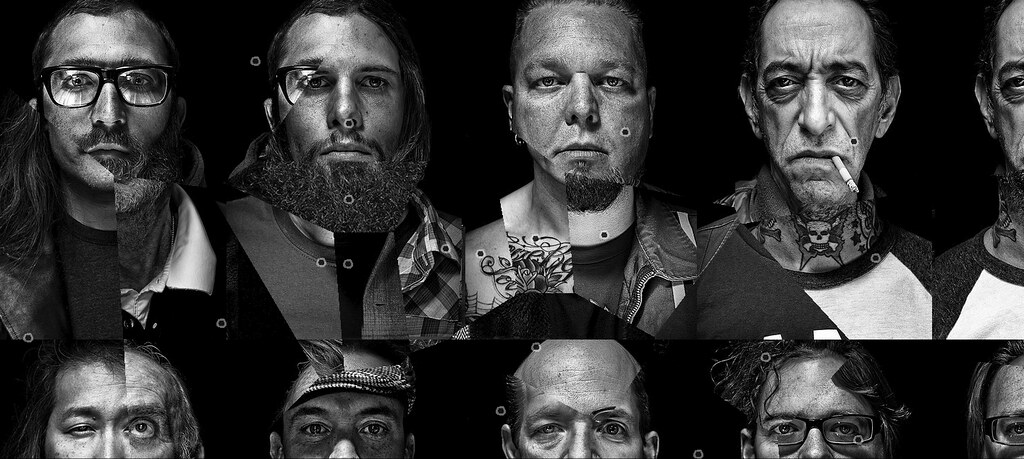
Kelly Castro’s Exteriors Series Remixed by Santiago Ortiz

Love is Patient Remix from Kelly Castro's Exterior Series

On Tuesday I went down to spend some time with Adobe’s Lightroom team down in San Jose (more on that later) and had a great opportunity to meet for the first time and visit with one my favorite photographers Kelly Castro. Kelly not only works on the Lightroom team at Adobe, but he is also doing some of the most interesting new photography around today. Kelly’s on Flickr as kelco and one project that I’ve especially admired over the past year and a half or so has been his unique collection of black and white portrait work entitled “exteriors.” Kelly is currently working on a book for this project and is very close to completing the photography for this project.

Kelly showed me during my visit his lighting setup and how he makes these amazing portraits. He spends about an hour per portrait after shooting them in post production. One of the things that Kelly also showed me during our visit was a really cool mashup using this series by Santiago Ortiz. Ortiz has done a number of other interesting visual projects that are well worth checking out here. The photo above does not do justice to the remix by Ortiz. To see remix of this project check out this link directly to get a better sense of motion and transformation for his version of some of Kelly’s photographs entitled “love is patient.”

My Photography Workflow 2009

Last year I wrote a blog post detailing my photography workflow. Since last year though my workflow has changed a bit as I’ve migrated from Adobe’s Bridge software to Adobe’s Lightroom software and thought that I’d post an updated article detailing how I process my images from start to finish. Questions about my workflow are some of the most common questions I’m regularly asked.

A Thousand Miles1. Step One. Capture the Image. My current tools that I use to capture images include a Canon 5D Mark II camera and the following Canon lenses that I carry with me 24 hours a day / 7 days a week: 135mm f/2, 24mm f/1.4, 50 mm f/1.2, 14mm f/2.8, 100mm macro f/2.8. In addition to these five lenses I also carry with me my MacBook Pro, a high speed card reader, a back up 5D M2 battery and battery charger and three CF cards (a 16GB and 2 8GB, all SanDisk). I also carry daily with me Moo cards that I can hand out to people that I meet to point them to my photography.

On longer photo outings or weekend trips I will also bring with me a 120GB USB powered Maxtor hard drive, my Manfrotto tripod, my Canon cable release and usually my backup camera body, a Canon 5D.

I shoot every day. I try to take advantage of every minute I can to shoot. Sometimes this is 10 minutes of walking on my way to my office. Other times it’s 2 hour photowalks after work. Other times it’s an hour photowalk during a lunch break. Frequently it also involves more serious outings including out of town weekends to new destinations to shoot.

My iPhone also always goes with me and I especially use the mapping features on the phone to find and shoot new locations.

I use Flickr, Zooomr and Google Maps to constantly research things that I want to shoot. Neon signs, graffiti, landmarks, unique settings, etc. I have several local maps as well as maps for almost every state in the U.S. of things that I want to shoot there. Prior to going out on a shoot I’ll frequently assemble a list of the locations that I want to shoot and structure the order so that I can most efficiently drive or walk to various locations that I’d like to shoot. I use my iPhone to help get me around in places where I’m not 100% familiar with the area.

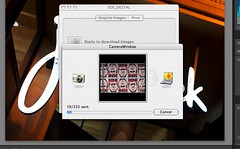
My Photography Workflow 2009, Plate 22. Step Two. Transfer the images to the computer. Most days my 32GB of CF storage is sufficient. For longer and more detailed shoots I’ll take breaks from shooting to manually transfer images from my cards to my MacBook Pro, freeing up the memory card for more shooting. Some days I’ll shoot as many as 2,000 frames which means a number of transfers from my cards (I always shoot in full quality RAW format) to my MacBook. Other days I may just have a few hundred frames to transfer. Pretty much daily though I’m transferring images from my cards to my computer. If you take a lot of photos like I do, do yourself a favor and invest in a high speed card reader. I use Canon’s proprietary software, Camera Window, to transfer my images to my computer. This software organizes my images into folders by date.

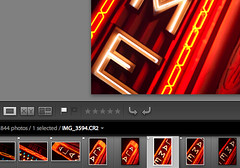
My Photography Workflow 20093. Step Three. Flag Images. My next step is to use Adobe Lightroom 2.3 to look at a day’s images. Here I go through a culling process where I use the flag tool to flag all of the images that I’d potentially like to process.

I don’t always end up processing 100% of what I flag, but mostly I’ll process these.

In general I’d say that I probably flag about 5-15% of the frames that I shoot.

My Photography Workflow 2009, Plate 34. Step Four. Develop images. Once the images for a day’s shoot are flagged I’ll use Lightroom’s “Develop” mode to make non-destructive adjustments to my RAW files in Lightroom. Typically I will alter the contrast, exposure, color temperature, brightness, fill lightening, blacks, clarity, vibrance and saturation. I’ll also use the vignette controls to create the optimal vignette (or reduce or eliminate natural vignette if need be). I’ll also use the spot removal tool to remove blemishes or dust from photos. I’ll burn and dodge typically as needed as well. This might sound like a lot of activity, but it actually happens very quickly. I’m trying to publish one million photos before I die, so I simply do not have time to spend a great deal of time on any single photo. Most photos are processed in 60 seconds or less.

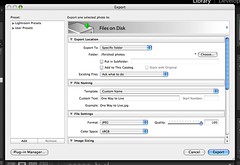
My Photography Workflow 2009, Plate 55. Step Five. Export JPG file. Once I’ve developed a photograph I’ll export a JPG version of it into a “finished photos” folder on my hard drive. I use the highest quality JPGs possible.

I also use this “finished photos” folder as my screensaver on my Mac. That way I can periodically see the most recent photos I’m working on as well as see any small blemishes big screen that I might have missed in the initial processing.

Sometimes I’ll go back in Photoshop and fix small blemishes or other things that I notice need work on my images during the day that they are playing in my screensaver on my Mac.

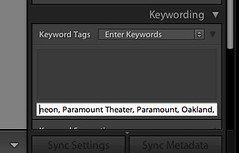
My Photography Workflow 2009, Plate 46. Step Six. Keywording. When I’m done processing a day’s photos, I’ll return to the library mode of Lightroom and synchronize the “finished photos” folder with Lightroom and begin keywording these images. I’ll almost always include the state and city an image is taken in, any reference to a particular organized photowalk or event or outing, and details to describe as best I can this image in keywords.

Keywords are very important for indexing your images for search on the internet and I could probably write a whole article about keywording alone. The key is to be as descriptive as possible and use any possible term that someone might use to search for the photo. If I take a photo of a painting at the Norton Simon Museum in Pasadena, for instance, it would likely be keyworded with “Norton Simon,” “Norton Simon Museum,” “museum,” “painting,” “Pasadena,” “California,” “Los Angeles,” as well as keywords of the artist, painting title, and anything in the painting itself “cow,” “farm,” “moon,” etc.

My Photography Workflow 2009, Plate 67. Step Seven. Geotagging. Once all of my images for a day are keyworded I’ll use Geotagger on the Mac to drag and drop my images using Google Earth in order to geotag them. If you are using a PC, Microsoft also has a free geotagging and keywording tool at their Pro Photo Tools page.

Geotagging my images at the file level (like keywording) means that I don’t have to geotag them on either Flickr or Zooomr. It ensures that I always retain this important data with my images both for search on my own computers as well as for search online.

Hot Donkey, There's a New Drobo Out! Welcome to Drobo 2.08. Step Eight. Archiving. Once a days photos are done, I will transfer the day’s RAW file folder onto my PC and on to a Drobo. I like to use Drobos because my images are then replicated across multiple drives protecting me in the event of a single drive failure.

I presently have four Drobos with about 10 terrabytes of storage. I will then take my finished JPG files and divide them into two categories “A” photos and “B” photos. I have another folder for A and B finished JPG files on one of my Drobos. At present I probably have about 20,000 finished photos that have not yet been published to the internet. About 20% of my finished photos end up in the “A” folder and 80% end up in the “B” folder.

I also periodically make sure that other copies of my finished photos are archived on hard drives off-site in case of theft or fire at my house.

My Photography Workflow 2009, Plate 79. Step Nine. Publishing.
Typically I publish photos online 2x a day on weekdays and 3x a day on weekends. I will always select 5 of my “A” quality photos to upload in each batch. I will also include 12-17 “B” quality photos. I arrange my photos so that my “A” photos are the last 5 that I upload, with the photo that I like the very best from that batch being the very last photo that I upload.

Because Flickr and Zooomr typically favor your last 5 photos when sharing with your contacts, this ensures that most of my contacts will see my better images. Although I select 5 “A” photos and 12-17 “B” photos, there usually is no rhyme or reason to which photos are selected and this is largely a random process pulling from my archives. The only exception to this is when I shoot something that is timely like a party or an event in which case I’ll try to upload some of those photos as soon after the event as possible.

And that’s pretty much about it. I wrote this post by the way in response to a thread about other people’s workflow in the Deleteme Uncensored group where I am active on Flickr. You can read that thread here to see how other people manage their photos online.

Microsoft’s DeepZoomPix Viewer is Pretty Cool

PhotoMetadataUrl=http://deepzoompix.com/API/PhotoMetadata.ashx?alias=thomashawk&album=2,Get Microsoft Silverlight

The slide show above is from a new photo viewer by Microsoft called DeepZoomPix. The technology feels a lot like CoolIris to me and I think that you are going to see more and more dynamic ways of viewing photos online like this in the future. The view above is pretty simplistic as an embedable slide player, but you get a far more interesting view if you actually click through to one of my albums. You can check out the more interactive version of the above slide show here.

Use your mouse or scroll pad to increase or decrease the magnification of the photos and to move around and explore a bit.

The player allows you to either upload your own photos to it or to link the player up with either your Flickrstream or your Facebook photos and import photos from there.

I found that it took me several hours to import a little over 400 slides for the slideshow above. For some reason it did not import all 2,000+ of my neon photos, but the average person probably doesn’t hae a 2000 photo high res slide show to put together either.

I think that this player will make for an interesting way to share sets of images from events, vacations, parties, really anywhere where you’d like to put together a relatively quick and easy slideshow.

The service has a fairly strict Code of Conduct which prohibits your using it to display any “nudity of any sort including full or partial human nudity or nudity in non-human forms such as cartoons, fantasy art or manga.pornography, obscenity, vulgarity, profanity, hatred, bigotry, racism, or gratuitous violence.”

The offering also is only available through the end of 2009. I’m not sure what happens to your slide shows after that but I suspect that if Microsoft chooses to discontinue the service that the shows could be deleted. Microsoft makes a point of noting that you should not consider this site as a primary place to host your photos and that there are no privacy controls, so anything you publish here will be viewable to the entire world.

According to Microsoft, the primary purpose of this technology is three-fold:

1. Provide an end-user friendly demo around a scenario that everyone can understand.
2. Show designers the capabilities of Silverlight for creating rich user experiences (UX).
3. Show developers how they can use various Microsoft client and platform technologies to easily create compelling and scalable systems.

You can learn more about this new viewer at the FAQ for it here.

Thanks for the heads up Steve!

New Documentary Out on Eddie Adams

In February 1968 Pulitzer Prize winning photographer Eddie Adams photographed police chief General Nguy?n Ng?c Loan executing a Vietcong prisoner, Nguy?n V?n Lém, on a Saigon street. It was arguably the most important photograph taken documenting the Vietnam War. In 1969 Adams earned the Pulitzer Prize for this famous photograph.

The trailer above is from a new documentary out on Adam’s life. Keifer Sutherland narrates the new documentary. The documentary is playing in New York City now with releases later this year in other cities.

After his most famous photograph Adams was later quoted in Time magazine saying:

“The general killed the Viet Cong; I killed the general with my camera. Still photographs are the most powerful weapon in the world. People believe them; but photographs do lie, even without manipulation. They are only half-truths. … What the photograph didn’t say was, ‘What would you do if you were the general at that time and place on that hot day, and you caught the so-called bad guy after he blew away one, two or three American people?”

The controversial and iconic image is frequently cited as the power that a still image can have to affect individuals and to influence society and politics.

Adams died in 2004. Here is his obituary from the New York Times, and here is an interview Adams did with PBS.