Richard Prince on Appropriating “The Catcher in the Rye”

The Catcher in the Rye, by Richard Prince

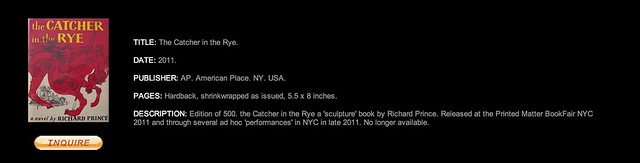
In 2011, Richard Prince republished a 500 run first edition of the classic JD Salinger novel Catcher in the Rye, under his own name. The reproduction was identical in every way except the author’s name was swapped from J.D. Salinger to Richard Prince.

The production value of the book was astonishingly high, a perfect facsimile of the original, right down to the thick, creamy paper stock and classic typeface. The text on the dust jacket—replete with the same iconic line drawing of the angry red horse—began, “Anyone who has read Richard Prince’s New Yorker stories, particularly A Perfect Day for Bananafish, Uncle Wiggly in Connecticut, The Laughing Man, and For Esmé–with Love and Squalor, will not be surprised by the fact that his first novel is full of children.” It was a dead-ringer through and through —not a word was changed—with the exception that the following disclaimer was added to the colophon page: “This is an artwork by Richard Prince. Any similarity to a book is coincidental and not intended by the artist.” Most shockingly, the colophon concluded with: © Richard Prince.

After the publication Sonic Youth’s Kim Gordon interviewed Prince.

Kim Gordon: But what about the change, putting your name on the J.D. Salinger…

Richard Prince: Well, oh. That’s just a favorite book. I’m aware of the implications. It’s kind of the Disneyland of book publishing. You don’t mess with images from Disney. You don’t near it. And Catcher in the Rye is also on lockdown; it’s almost become an institution, it’s very sacred. It’s very rare to get a great first-edition copy.

I reread the book. If you have a book in your collection, it has to be a well-written book. I don’t collect books just because other people collect them, and I’m not going to have books in my collection if I think it’s badly written. Unless it’s deliberately bad or it has to do with the culture. I love deliberately badly written books. But when I reread Catcher I realized how contemporary the writing was, and then I was talking, I had the idea of putting it out again. And I think the idea of republishing Catcher, my contribution to that book was simply—and I know this is going to sound terrible, or maybe it’s not—but I just wanted to double the price.

Kim Gordon: To make it have the value you think it ought to have?

Richard Prince: Yeah, I just wanted to make sure, if you were going to buy my Catcher in the Rye, you were going to have to pay twice as much as the one Barnes and Noble was selling from J.D. Salinger. I know that sounds really kind of shallow, and maybe that’s not the best way to contribute to something, but in the book collecting world you pay a premium for really collectible books. I thought, we charged, I think on the book flap it’s $62. There’s a certain kind of adolescent thinking there that I can’t seem to get away from. And I don’t know if I should get away from it, but I certainly acknowledge that it might not be the most interesting way to contribute to the making of that particular object, but I like the fact that the price is twice as much. And it’s enough.

Source

On William Eggleston Meeting Henri Cartier-Bresson

William Eggleston: You know, I had a meeting with him [Henri Cartier-Bresson], one in particular, it was at this party in Lyon. Big event, you know. I was seated with him and a couple of women. You’ll never guess what he said to me.

Drew Barrymore: What?

William Eggleston: “William, color is bullshit.” End of conversation. Not another word. And I didn’t say anything back. What can one say? I mean, I felt like saying I’ve wasted a lot of time. As this happened, I’ll tell you, I noticed across the room this really beautiful young lady, who turned out to be crazy. So I just got up, left the table, introduced myself, and I spent the rest of the evening talking to her, and she never told me color was bullshit.

Source.

How to Make Your Photo Experience on the Web Better and Faster

As a fan of the new Flickr redesign, I’ve been particularly impressed with how fast so many images load — an impressive feat given the new image rich, justified, mosaic view, with infinite scroll. Seeing more images, faster, invites more engagement and makes the site a more compelling place to visit. I think Flickr engineers have done a lot of optimizing behind the scenes and are continuing to tweak the site in new ways to make it even faster.

There are some users in the Flickr Help Forum, however, who moan about the newer version of Flickr being slow for them. While it makes some sense to me that a more image intensive design would impact speed, as fast as the new Flickr is for me, (on both my own account and other test accounts), I think there is more to it than just that.

In a new image intensive internet, companies can’t always design and optimize for the lowest common denominator. At some point engineers and designers must just let the Internet Explore 6.0 crowd go. If they haven’t upgraded by now, it now becomes their problem not yours.

Staying on top of the most current technology can help optimize your internet experience. Some of these things that I’m doing are free and some cost money. I do understand that not everybody has the money to just go out and buy a new computer and am not suggesting that it’s your responsibility to do all of these things. These are just some ideas that might help you make your internet experience better and faster.

1. Upgrade your computer. My rule is that I upgrade my primary computer (a MacBook Pro) every three years. As a heavy computer user (and as someone who makes money from my photography and must consider time as a resource in that), this is a no brainer. If it’s been over three years, and you can afford it, consider buying a new machine. Get a Mac. 😉

2. Upgrade your computer’s operating system. I’m currently running the latest version of Apple’s OS Mountain Lion, Mac OS 10.8.3 10.8.4. Make sure you are using whatever is the most current OS for your machine.

3. Consider your internet connection. Are you getting the fastest possible speeds? Years ago when I was on DSL, it was announced that they were putting U-verse fiber into the neighborhood. I was the first guy to jump on that and make sure I got it. Survey each of the internet service providers in your neighborhood and find out what their upload/download speeds are. Don’t stop there though. Also make sure you are on the fastest plan that they offer. The U-verse plan that I have is their Max Turbo and provides 24 Mbps download speeds. Consider the value of your time and make sure you are on the fastest plan possible from your ISP.

4. FREE! Make sure you are running the latest version of Google’s Chrome browser. Once you finally get rid of IE, Safari or Firefox, you will learn to love Chrome — it’s faster and better.

5. FREE! Change your DNS settings to Google’s public DNS, 8.8.8.8 or 8.8.4.4 A lot of people don’t know about this trick, but it will dramatically speed up your internet. Google gives you instructions on how to do this here.

6. If you use your computer remotely a lot (like I do) in places where you don’t always have good, fast, wifi, consider getting a Sprint 4G card. Heavy computer internet surfing takes a lot more bandwidth than cell phones. Using your cell phone to tether to your computer probably works if you just need an occasional log in (I use FoxFi for this on my Android phone which is free) — but this data counts towards your bandwidth limits. Sprint is the only current wireless provider that I’m aware of that offers truly unlimited, unthrottled mobile bandwidth in the U.S. Their 4G service, is a bit more expensive, but is generally speaking very reliable and very fast.

Why Aren’t Search Engines Making Better Use of Their Social Networks for Image Search?

One thing I’ve noticed more and more over the past few years is what a poor job traditional image search engines do vs. social networks.

By using social information around photos (likes, faves, comments, +1s, etc.), social networks typically produce much superior image search results than traditional image search.

Take this search of Coachella 2013 for example.

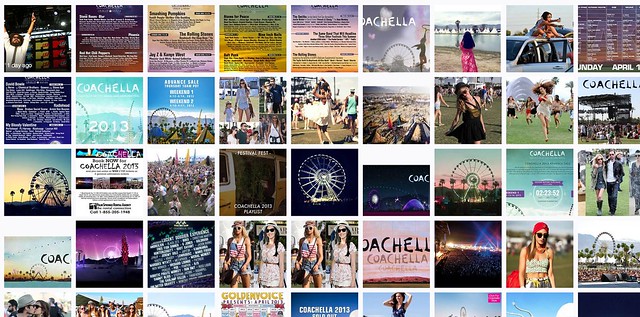
Screen Shot 2013-06-05 at 10.45.53 AM
Yahoo Image Search: “Coachella 2013”

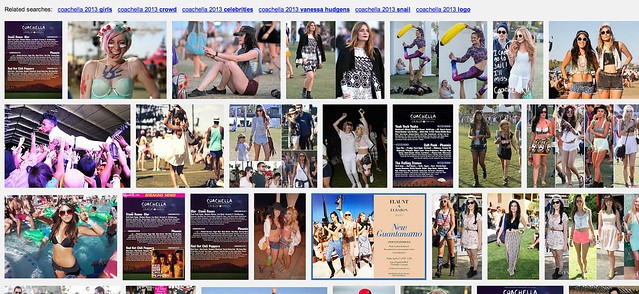
Screen Shot 2013-06-05 at 10.46.24 AM
Google Image Search: “Coachella 2013”

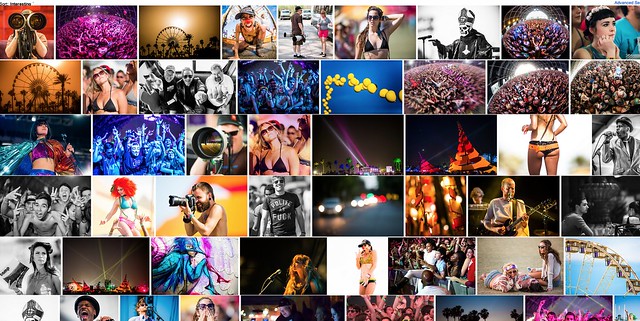
Screen Shot 2013-06-05 at 10.47.28 AM
Flickr Image Search: “Coachella 2013”

The first image comes from Yahoo (or is it Microsoft these days, I can’t keep it all straight). It’s not very good. It shows too many images of just the lineup vs. actual fun interesting photos of the event itself.

Google’s image search results are better, but still not as good as many of the images I find on social networks.

Now I may be biased (as I shot this particular event) but I think Flickr’s search results are *far* better than either Google or Yahoo Image search.

I’m working on a project right now to photograph the 100 largest American cities. When I’m researching things to photograph in these cities I almost always go first to Flickr (because it’s the largest database of highly organized quality photos on the web). I will also look at Google+ too, sometimes. Google+ doesn’t have as many high quality images in the total database as Flickr, yet, but I find some pretty good stuff there sometimes still. Most of Flickr’s advantage here over Google+ just has to do with the fact that they are older and have more images indexed.

Lately I’ve also played around with graph search on Facebook for images — I haven’t been very impressed there at all though.

The one place I hardly ever go is to the actual Google or Yahoo image search engines — because the results are so inferior.

Here’s what I don’t get: *why* are the results at Yahoo and Google Image search inferior? Google and Yahoo have access to proprietary internal social data around photos in their social networks, why isn’t that coming through better in the signal for high quality images.

On my example search using Coachella 2013, not a single Flickr photo appears on Yahoo’s first page image search and not a single Google+ image appears on Google’s first page image search.

Shouldn’t these search engines be better mining organically and socially ranked superior content? It’s not that these engines don’t index it, they do, it’s just not ranking well.

Beyond just better image search, Google and Yahoo *should* have another significant incentive to better include their social images into image search.

All things being equal, assuming you could improve image search results, wouldn’t you want to drive more traffic to your own internal social network, rather than to some unrelated destination — and wouldn’t you want to reward the best photographers on your social network with more traffic vs. some random SEO rigged site somewhere?

Why aren’t image search engines doing a better job with social?

Another added benefit to driving image search traffic to your social network, is that the presentation there is usually better, more uniform and consistent. When I’m tempted to go further on an image from Yahoo or Google, I may end up at some odd sized photo, in some odd format. With a G+ or Flickr result I get a strong consistent image experience that I’m familiar with.

As an unrelated topic dealing with image search on Flickr — the best social image search on the web today — Flickr needs to give us the ability to block certain users from our search results. Many popular photographers will pollute image search on Flickr by falsely tagging things that are not in their popular photos, just to try to garner traffic.

Take this search on Flickr for dog for example. So many of the first page results are not photos of dogs at all. Flickr should allow us to block certain users from our search results in order to better refine them. When we block people from our search results, this should also be a signal to Flickr that this user should rank much worse in search. If users get the message that they will be penalized for purposely mistagging their photos, they will be less likely to try and game the system this way, resulting in better image search on Flickr for all of us.

Snapsation Launched Today at LeWeb

Are you a photographer looking to make money?

Congratulations to my good pal Chris Chabot on the launch of his new photography services internet site today at LeWeb, Snapsation. Snapsation is an innovative new site that matches photographers and clients looking to hire photographers.

If you are a professional photographer or just an amateur looking to buy a few new lenses, either way you will want to check out this new place to market you and your work. You can find me there at http://snapsation.com/thomashawk

Yahoo Running Television Commercials for the New Flickr

Yahoo Running a Television Commercial Promoting the New Flickr

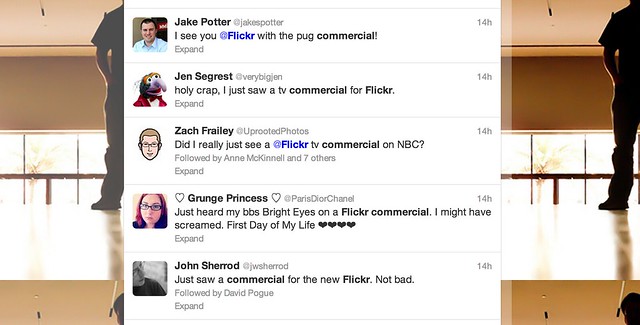
Lest anyone doubt Marissa Mayer and Yahoo’s new commitment to photo sharing site Flickr, apparently Yahoo is now running a paid television commercial for the photo sharing site — the first of its kind as far as I’m aware. Following some of the tweets on the commercial spot, it sounds like it may have begun running yesterday on NBC programming.

The advertisement, which features the Bright Eyes song, “The First Day of My Life,” shows a photo montage of pug dogs, among other images. You can watch the commercial yourself above from Yahoo’s corporate YouTube account.

The commercial comes out a few weeks after a successful new redesign of the site that gave all Flickr users a free terabyte of high res photo space.

I posted previously on an informal statistic of uploads being up 71% at Flickr since the redesign, these statistics would seem to be in line with other metrics that Yahoo is also seeing internally, according to Flickr Community Manager Thea Lampkin.

“[W]e have a lot of data already and are measuring traffic to all the new pages (don’t worry, it’s all anonymous),” writes Lampkin. “So far the metrics have been overwhelmingly positive, and we’re very happy with how Flickr members everywhere are interacting with the new site. Sets in particular are getting more traffic than ever before.”

Flickr Users Uploading 71% More Photos to Flickr Since New Design Rolled Out

Founder of Flickr Likes the New Flickr

Recently I blogged about the new design on Flickr noting that engagement on my own personal photostream had skyrocketed. By my own estimation, activity (comments/faves) have increased approximately 294% on my stream since the redesign.

Despite a loud, vulgar, disrespectful chorus, by a small group of torch and pitchfork type haters in the Flickr Help Forum, I’ve wondered how the larger Flickr community has felt about the site changes. To hear it told by the haters, *everybody* on Flickr hates the new design and they are all leaving in droves for other sites on the web.

One of the interesting things about Flickr, is that each photo on Flickr is assigned a unique ascending number on upload that signifies its numerical place as a Flickr upload. Because of this structure, it is fairly easy to measure the pace of uploads at any given time on Flickr.

I wanted to see if users were uploading more or less photos since the changes.

My measurement is approximate, but would seem to indicate that the number of uploads to Flickr since the site redesign have increased *dramatically*, about 71%.

To measure this, I tried to find a photo about as close to the redesign implementation as possible. In this case I found this photo taken by Veronica Belmont posted at about 3pm PST on the date of the change, May 21. This was within minutes of the change as implemented on Flickr. This is what I’m using as a baseline image. It is Flickr photo number 8,776,546,808 (you see this number in the url of the photo).

Next, I went and looked at a recent photo uploaded today. This photo by my contact rollerphoto works. This photo is upload number 8,855,853,505

So roughly between today and the changes made by Flickr, users have uploaded almost 80 million photos to the site. The time measured is about six hours short of six days.

Next, I went and found an older photo uploaded about six days *before* the change was implemented. In this case I found this photo taken by my contact Jazzyblue TR. This photo is one hour short of six days from the changes. This photo is upload number 8,730,146,140.

So, in the 6 days prior to the change, users uploaded about 47 million photos to the site.

So, roughly, as measured in the six days before and the six days after Flickr’s new site design, uploads are up about 71% site wide.

Now, number of photos uploaded is only one metric to measure when looking at the effect of this change. As I mentioned earlier, personally my own engagement numbers are up even higher — but to hear it told by a loud, vocal contingent of about 3,000 members in the Flickr Help Forum, 99% of users hate this change. This simply is not true. The vast silent majority of Flickr users are chugging along just like they always have been and I suspect Flickr signups have *far* exceeded deletions since the change has been made.

Flickr can view much more data internally than I can from the outside, but I suspect that by every way they measure success on the site, this most recent change has been an absolute homerun for them.

Unfortunately, with all change comes haters. Flickr would do well to ignore these haters. Of the almost 100 million Flickr users, we may lose a few thousand of the most vulgar and vitriolic accounts on Flickr, but I suspect what we gain in terms of new users is far greater.

Interestingly enough, earlier last week, the Founder of Flickr himself, Stewart Butterfield, had high praise for the new design on Flickr. Butterfield left as General Manager of Flickr back in 2008, but remains a user still today. In a tweet, Butterfield described the new design as “fantastic,” noting that history will ultimately vindicate the work as “nicely done.” I posted about this praise by Butterfield in the hatefest in the Flickr Help Forum and it only took about 21 minutes for one of the haters to compare his words with Adolph Hitler.

Hopefully the worst of these haters *do* actually leave the site as they keep threatening to do over and over and over and over again, and let the rest of us who *do* like the changes enjoy the new design for what it is, a new, better, fresher version of Flickr.

Dear Marissa Mayer, Please Give Us a Tool to Better Block Bad Actors on Flickr

As an opinionated blogger, watching Flickr roll out recent changes to the site this past week has been an interesting experience, to say the least.

Thanks, Marissa Mayer, for making Flickr awesome again. Thanks also to the Flickr team who have worked so hard to roll out these changes. The new Flickr is the most photo immersive experience anywhere on the web. It is far more engaging and far more beautiful than I ever could have imagined.

Witnessing and countering in the vile hatefest that the Flickr Help Forum has become this past week has also been interesting. Simply for expressing my opinion in a public feedback forum on the new design, I’ve been called a shill, a troll, a sock puppet, a scrotum sack, and many things far worse that I don’t really feel like printing.

I’ve been told that my photography is absolute crap, been accused of working for Yahoo, of being related to Marissa Mayer, of trying to pump up Yahoo’s stock price by supporting the changes — my work, motives and integrity have all been subject to relentless attacks there.

There is little civility in a forum taken over by the ugliest and most vulgar of what the web represents.

The vandalization of Marissa Mayer’s own Flickrstream, and the encouraged vandalism in the same forum, saddens me. To see someone leave an offensive comment on a Mother’s Day Photo, of all things, makes Flickr less of a place to want to spend time.

One Flickr staffer had to actually turn off public comments on his Flickrstream. “You are going to hell,” was the comment that made him turn them off.

There is, at least, a partial answer to this problem: give us a tool to block other users on Flickr.

Flickr already does have a blocking feature of course, it’s just super weak and only prevents someone from leaving a comment on one of *your* photos.

On the other hand, even if you block someone, they can still attack you in all sorts of other places on Flickr, where you spend time. Flickr users should be able to use the public areas of the site without being subject to vile personal attacks. The Help Forum, Groups, other people’s photos, all should be places where Flickr users can visit and feel safe and comfortable.

I left Flickr groups for good a few years back (so did a lot of my friends). The reason why I left was that groups were becoming too ugly. Especially as an opinionated and high profile user, I found myself subject to constant terrible attacks. There was nothing that could really be done about this. Sure, you could report someone violating the Flickr Community Guidelines to Flickr, and maybe 5 days later their account would be deleted, but then they’d just make up a new troll account and be right back at it over and over again.

It was simply easier to just leave the public community of Flickr than to deal with the hate.

When I first joined Google+, I saw some of these same bad actors appear over there, too. I’d watch both myself and my good friends be attacked by others — jealous, petty haters and trolls, mostly. But then Google did a really smart thing. Google rolled out a really strong blocking tool and, just like that, all the hate went away.

You see, on Google+, when you block somebody, they become entirely invisible to you. They are entirely filtered out of all of your views on G+. Poof. Gone for good, not just in your stream, but *everywhere* for you on the site — and that has made Google+ a far better, nicer and more polite place for community than Flickr. Where the Flickr community is a negative hatefest, the G+ community is the most amazing, optimistic, supportive community I’ve ever known online.

You see, blocking the worst of the web doesn’t just filter it out of your view. The more significant thing that it does is it *encourages* civility.

Right now on Flickr we have no power against incivility. People can be as nasty and as rude and as ugly and as disrespectful as they want. They can spam the Flickr help forum with images of excrement (as they actually did last week) and you can’t do a damn thing about it — but if you give us the ability to block these bad actors, then their power is reduced. They know that as soon as they begin the ugliest of hate that the vast majority of positive contributing members will simply block them. Their audience is diminished and soon they are standing on a soap box shouting only to the 10 or so other users who share their hate filled outlook on life.

Before I quit using Flickr groups, one particular nasty member was looking at the photos that I was favoriting (this is forced public and Flickr won’t allow me to control who gets to see it — unlike on G+ where it is private) and this person began leaving vile comments on every photo that I was commenting on. This way, every single one of their comments was showing up in my recent activity, even though I’d blocked them from commenting on my own photos. That’s just wrong.

If Flickr wants to be a place where community can flourish, they need to give us tools to protect ourselves from the hate.

Marissa, I don’t need to tell you how bad the hate can be on Flickr. If you’ve reviewed your own Flickrstream this past week, you know what I’m talking about. It’s deplorable. Especially when any user can so easily just keep making anonymous troll account after anonymous troll account — please, give us a tool to remove the bad actors from our Flickr experience.

This week’s new design work was fantastic, now let’s go to work on improving the community for those of us who want to positively contribute there as well.

Top 10 Ways to Get the Most Out of the New Flickr

Earlier this week, Flickr rolled out the most significant changes to their service since purchased by Yahoo back in 2005.

In addition to a major web redesign and a new Android app, Flickr also changed the basic fee structure of their account types and storage limits.

Former Pro users are being allowed to retain their $24.99 year fee structure for unlimited, ad free service. If you are a Pro account user, nothing changes if you want to keep it.

Free account users were all given 1 terabyte of free high res photo storage. Free accounts are still ad supported, as they have been in the past, but now you are no longer limited to only viewing your 200 most recent uploads to the site.

Despite the typical torch and pitchfork mob rage emanating from the Flickr Help Forum*, (a group of super negative Flickr users representing less than .01% of all Flickr users), I’ve found over the past week that engagement on my own photos is up dramatically. More specifically, based on my Flickr stats page, engagement (as measured by comments and favorites) is up approximately 294% on my own photos since the new release.

*Dear Marissa Mayer, PLEASE, give us the ability to block users on Flickr, it would make it a much nicer place for those of us who want to enjoy it. 🙂

I have no way of knowing, more broadly speaking, if the stats numbers look this good for Flickr in general, but if they do, I suspect that they are very happy indeed with the success of this week’s new features.

This post is not meant to be a debate about the new changes; this post is for those of you who are ok with the site design and are now looking for ways to get the most out of it.

On with the list.

Tip #1, Make The Last Photo You Upload in a Batch Count

1. Consider a strategy for uploading your batches of photos. I upload two batches of photos to Flickr a day — one in the morning and one in the evening. Your upload strategy and the ordering of your batch uploads matters. With the new Flickr redesign, photos on the flickr.com homepage are really, really, big. Big photos get far more engagement. However, the only photo that gets shown ginormous on the flickr.com homepage is the very last one that you upload. The 5 before that are shown as small thumbnails there.

So, if you are uploading a batch of photos to Flickr, make sure the one that is uploaded last is the best of the batch. Also, landscape oriented and square photos show up much larger on the flickr homepage than portrait oriented crops. So, all other things being equal, consider making sure your last photo uploaded in a batch to Flickr is one of your strongest square or landscape oriented photographs.

Tip #2, Flickr is Your New Cloud Photo Back Up

2. Anyone who ever complains about losing photos on a crashed hard drive again is just dumb. While you, of course, should not depend on Flickr as your sole backup strategy, everyone now has a free 1TB drive in the sky for photos.

Even if you don’t want to share certain photos, or you only want to share them with your very close friends and family, upload them to Flickr anyways and mark them private or friends/family only. If nothing else, you will have a backup of last resort if you need to go get those photos later. I don’t know of anyplace else on the web where you can get 1TB of free storage. Take advantage of that not only for the photos you want to share publicly, but all your photos.

Hunt Peck

3. This is not necessarily a tip new to the new Flickr, but it’s one everyone ought to know about — keyboard commands..

On Flickr you can use the F key to fave a photo, the C key to comment on a photo, the G key to add a photo to a group, and the T key to tag a photo. This will make your Flickr experience much faster. For those complaining that, with larger photos, they now have to scroll down the page to comment, no you don’t — simply press the C key and you will jump right there, with your cursor right in place and ready to type.

Tip #4, More

4. … = MORE! This is a universal symbol on the internet for more. Anytime you see … anywhere, this means that there are things hidden underneath the … that you may want to find. It’s a good way for a site to de-clutter. I’ve seen many people ask where their favorite lesser used Flickr feature went (EXIF data, gallery functionality, all sizes, etc.). Just click on the … and you’ll find it all there.

Tip #5, Make Sure Your Sets Are in the Order You Want Them In

5. Make the most out of your sets. By default, Flickr puts your sets in the order created. Your most recent sets are shown first, and older sets are shown last. This may not be the best way to present your sets though. One of my most viewed sets is one of my oldest, my 10 faves or more set. If I didn’t manually move this to the top of my sets page, it would be buried in the over 1,800 sets I have on Flickr. Go to the Flickr organizer page here and make sure that your sets are in the order that you want them in.

If you have a lot of sets and find it cumbersome to move them around in the organizer (like I do). Shrink your browser view to super small and it will make more and more thumbnails in the organizer that are easier to move around.

Make sure your sets page shows your best sets on the first page. This will give people a great first impression of what your albums are all about.

Consider making a few “best of” sets on Flickr. If you use Jeremy Brooks’ SuprSetr app it will automatically tag all of your photos that have been favorited 10 times or more fav10. It can then build an album for you of just these popular photos of yours that you can highlight on your sets page.
Just Re-Upped for 2 More Years of Flickr PRO!!!

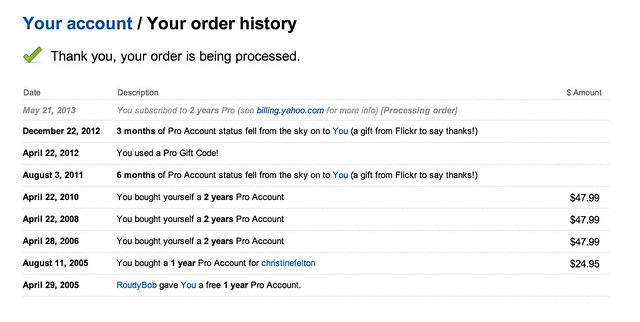
6. If you have a Flickr Pro account, do NOT let that expire. Your Flickr Pro account is worth more than it’s ever been worth in the past. It’s pure gold. Getting unlimited, high res, ad-free photos was the deal of a lifetime. Although Flickr is no longer offering this extraordinary deal anymore, if you have it, you get to keep it.

Go here to check on the status of your Flickr Pro and I’d recommend both renewing it now AND making sure you are set up as a recurring Pro so it automatically charges your credit card in the future. Don’t lose this awesome benefit.

Tip #7, Reupload Your Avatar

7. Make sure you reupload your Flickr avatar on the new Flickr. The old Flickr used a smaller version of your avatar, so you might notice that you have sort of this weird small avatar over a larger, dimmed out version of your old avatar on your Flickr page. You can reupload a better sized version of your avatar which will override this and make your new, larger avatar look much better.

Tip #8, Make Sure to Personalize Your Cover Photo

8. Change your cover photo. Flickr added a number of new cover photos by default with the new page design. Go to your page and change your cover photo to something new. Find a photo of yours (or a portion of a photo of yours) that uses an extreme landscape crop and will fit there and work well. I used a mosaic strip of photos for mine.

Tip #9, Review Who Calls You a Contact

9. Make sure to review your “who calls you a contact” page. This is a page that shows everyone on Flickr who has contacted you. You may be surprised that some of your friends have contacted you that you are not aware of. Review this list to see if you’ve missed any old or new friends on Flickr and add them back if you want.

Tip #10, Mobile

10. Make the most out of mobile. Although 95% of my own personal Flickr time is spent on the web version, don’t forget about mobile. Earlier this week, Flickr rolled out their Android app, which is every bit as good as their previous iPhone app and probably even better.

One of the easy things to do with this app is to favorite photos by your friends. Simply pull up your contacts photostream on the app and tap/tap to fave a photo. You can scroll down and see different friend’s photos or you can scroll sideways and see more photos from a single friend. When you have down time on the bus, or are waiting for your table at Bob’s Big Boy or wherever, use that time to favorite photos of your friends. They will see that and favorite your photos back most likely. 🙂

Ok Glass, Get Dogfood

Bonus tip: Get the new Flickr app for Google Glass. It’s awesome! 😉 Just kidding. There’s no new Flickr app for Google Glass…

…yet.

You can find me on Flickr here.