

There’s Something I’ve Been Wanting to Tell You

Eat More, Plate 4

Politics as Usual

Swing Swing

Adobe Photoshop CS5 Boldly Empowers the Digital Artist
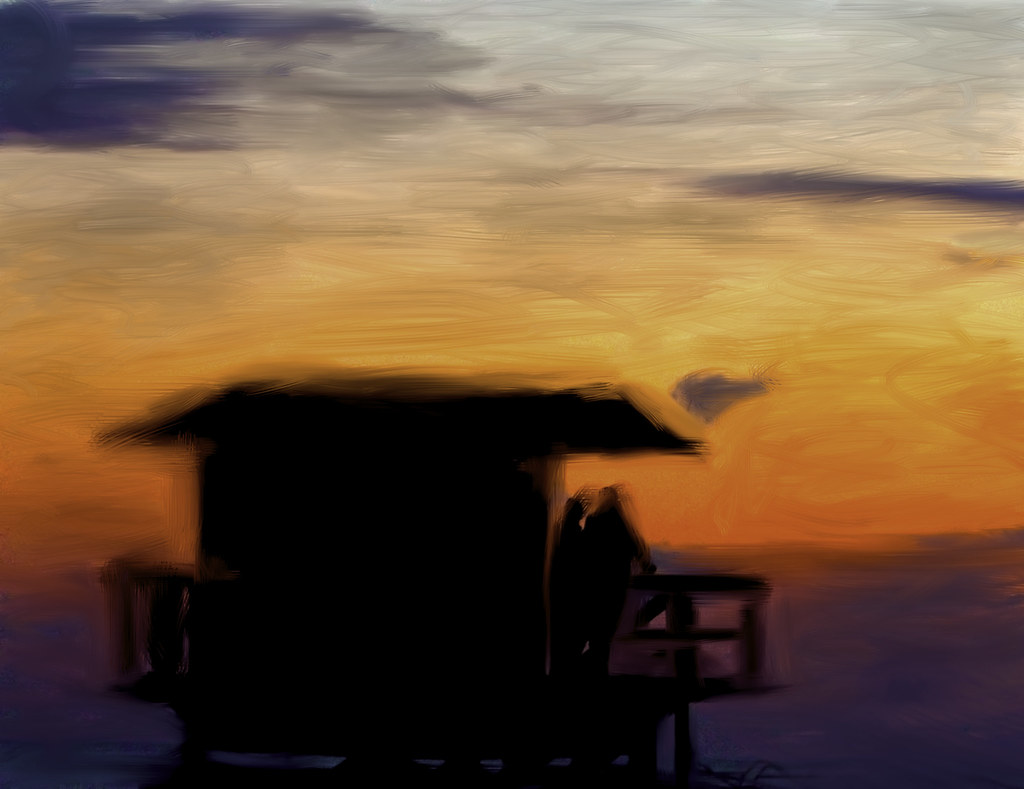
So I’ve been playing around with Adobe’s lateset version of Photoshop that will be coming out in the next month, CS5, and I have to say that I think it represents a bold, dramatic and fundamental shift in digital art creation. I’ve been using Photoshop for many years now but this version has blown me away like none that I’ve ever seen.
The new version has lots of cool new toys and tools for photographers, which I’ll get into, but for me by far the most significant achievement in this new version is that it has for the first time made painting available to the photographer.
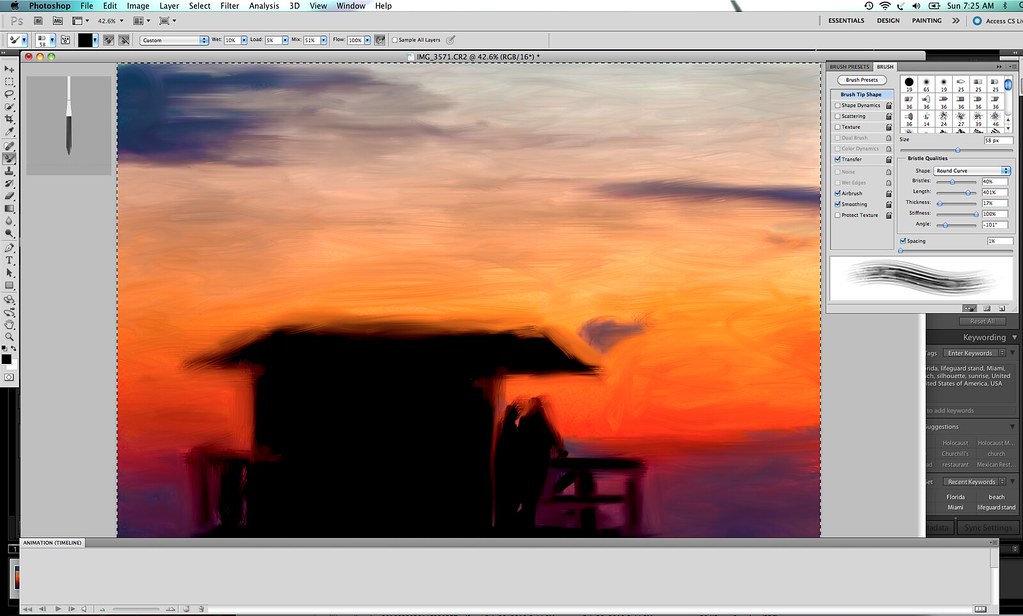
I’ve wanted to paint for years, but have never had the talent with a physical paint brush. I’ve tried various software solutions to paint digitally and never have they done what I want. Usually painting effects in digital imaging software come out more as cheesy filters, routinely and uniformly applied over an entire image, resulting in something that feels more like a faux painting than a painting. But with Photoshop CS5’s new painting module, you have a new unprecedented amount of control over painting and brushes and can manually now paint over a photograph and turn it into the most realistic version of an actual painting I’ve ever seen.

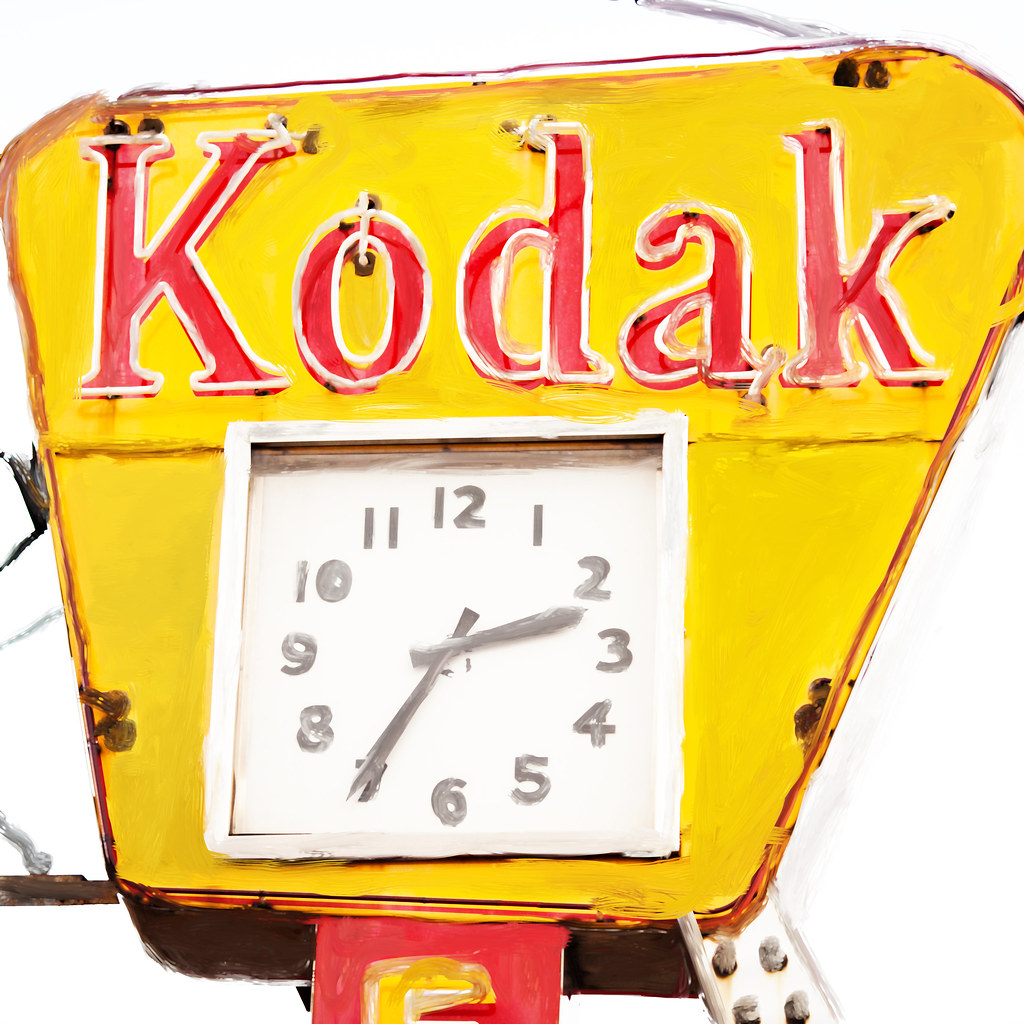
I can’t wait to see what people end up doing with the painting module in the new Photoshop. Yesterday I uploaded my first “painting” to Flickr (above). It’s very crude and rough and I only spent about 10 minutes on it, but I think you get the idea with what is possible. I’m really looking forward to trying to replicate more photorealism with some of my neon sign photographs especially. The other two images in this post of the reclining nude and neon Kodak sign are also paintings made from photographs of mine.
So more than anything the painting tools and their total realistic representation blew me away in Photoshop CS5. I’m impressed big time. I was so impressed with that new feature that I hardly had time to really dig into more of the new tools for the photographer.
So what else is new for the photographer in CS5?
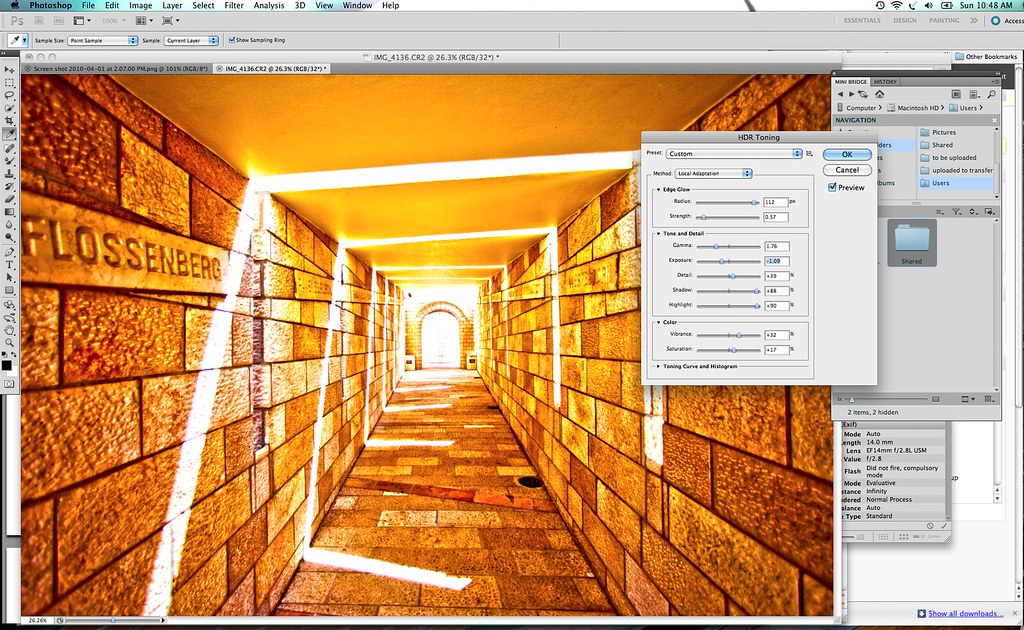
1. HDR, HDR, HDR. Now I’m not really an HDR photographer (yet), but Photoshop CS5 has new HDR functionality allowing you to combine multiple exposures to create hyper-realistic photos. Now I’ve tried HDR before in both Photoshop as well as other software packages and could never really get the hang of it. It seemed super hard to work with. It feels much easier in Photoshop CS5. CS5 also brings you the ability to create a HDR like photo from a single photograph rather than multiple exposures by using HDR Toning which mimics the HDR look in photos.
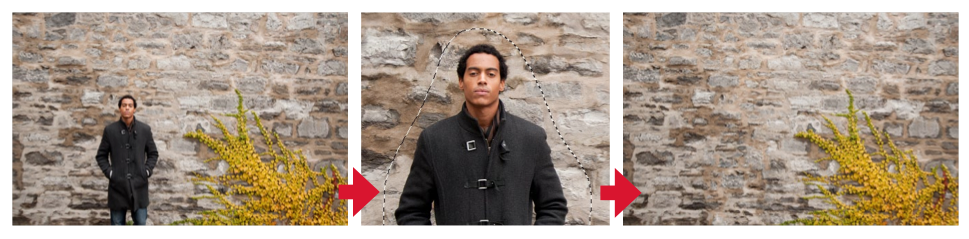
2. Much cleaner removal of unwanted elements in your photos. In the past if I wanted to remove something from a photo it was very difficult. Painstaking. It was tough with the tools to get all of the nuance of color around an image, the little halo left behind, etc. Now Photoshop has what they call “content-aware fill options”.
Basically when you remove something it automatically analyzes the surrounding area to replace perfectly what was around that content. It looks at the lighting, tone, sharpness, and essentially dynamically rebuilds what should have been there. It can even handle complex patterns where someone is standing in front of something like a wall or something with an intricate design. Adobe showed me an example where they actually remove a guy from in front of a wall. You’d never have known he was ever there.
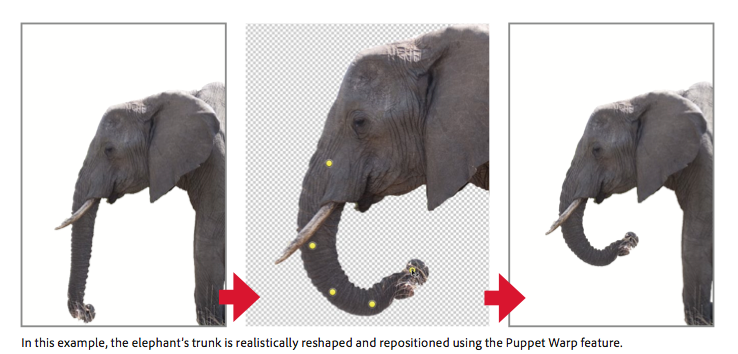
3. Puppet Wrap. Because you are the puppet master, right? It’s hard for me to explain puppet wrap exactly. But basically you can reshape objects in a frame, actually recompose a subject. See Adobe’s example of the elephant’s trunk.
4. Automatic lens correction. I don’t really use this, but the new Photoshop can now correct lens distortion better, correcting the three most common lens-based errors: geometric distortion, chromatic aberration, and vignetting.
5. Along with Photoshop CS5 comes the new camera RAW 6 plug in. This is the same camera RAW plug in that is presently being tested with the Lightroom 3, beta 2. Most significantly, Adobe has taken noise reduction to a new level with Camera RAW 6. I am amazed at how effortlessly and easily Adobe removes the noise from even the highest shot ISO images. Of all the things I’ve been playing around with in the Lightroom beta right now, this is by far the most significant improvement for me personally.
My only gripe about the noise reduction capabilities in the new camera RAW is that the results of your noise reduction (and sharpening) are only visible if you view at actual size 1:1. I wish that Adobe would render full sized view options with the actual results of noise reduction and sharpening instead of making you have to zoom in all the time — at least this is the case in Lightroom 3 Beta 2.
6. Adobe added a new mini bridge module for Photoshop. Now you no longer have to switch back and forth between Bridge and Photoshop to look at your photos from an organizational standpoint. Simply use the mini-bridge view from within Photoshop.
It should be noted that with Photoshop CS5 Adobe also introduced over three dozen new little productivity saving changes, features, shortcuts, etc. There are new features like cropping with a rule of thirds overlay, one click straightening, the ability to do better and easier conversions from color to black and white with tints to get tinted monochrome images and others.
Adobe also introduced some new tools to build 3D graphics with Photoshop. I can’t imagine using these personally, but if you do create graphics, this will be a nice new tool as well.
As always, you can easily use Lightroom as your first pass photo application and then use the Photo > Edit In > menu in Lightroom to bring the adjusted photo right into Photoshop to do your final finishing on it where wanted/needed.
Overall I’m *extremely impressed with the new version of Photoshop. While I do 95% of my processing of my images in Lightroom and usually only go into Photoshop for touching things up, it still is a must have application for my own workflow. More significantly going forward though, I will definitely be using Photoshop *much* more to keep up with my new hobby of painting my photographs. I’m also looking forward to exploring HDR a bit more and all of the other improvements that the new Photoshop brings to the table.
Hats off to the Photoshop team on the best version of Photoshop yet!
Stephen Shankland also reviewed the new Photoshop CS5 for CNET here and Adobe Featured Blogs here.
Hey Walt Disney Company, Photography Is Not a Crime
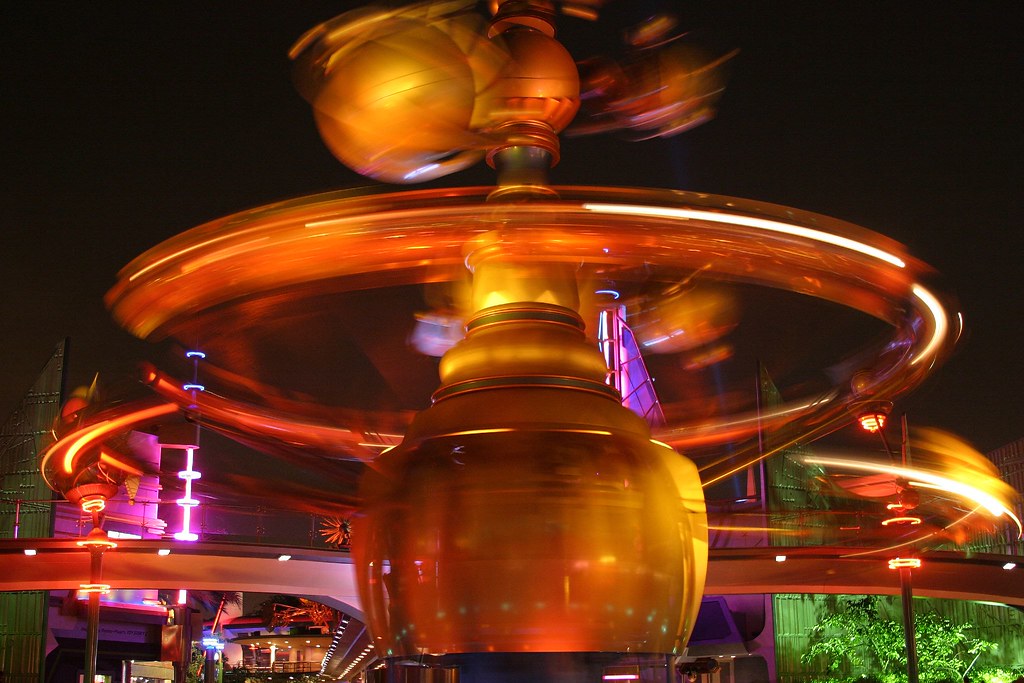
I have to say that all of my own interactions with the Disney company have been enormously positive. I’ve shot both Disneyland and Downtown Disney in Anaheim and never had any trouble myself. When I shot Disneyland a few years back, I set up my tripod and shot several long exposure shots of the rides and was never hassled once. One time a Disney employee came up to me to ask me about my photography, but he was super pleasant and only was curious personally as to how I was making my photos. All in all I have a high regard from my own experiences of shooting on Disney property and their Magical Kingdom.
Disney does in fact allow personal photography on their various properties and goes so far as to even allow folding tripods that can fit inside a backpack (what I used when I shot at both Disneyland and Downtown Disney in Anaheim).
The Walt Disney Family Museum in San Francisco doesn’t allow photography, which kind of sucks, but the entertainment properties personally have always been pleasant for me. Of course *everyone* typically takes photos at Disneyland and Disneyworld and there are millions of photos online.
So I was very disappointed to learn today from photographer William Beem that he had a terrible experience recently while shooting Downtown Disney at Disney World in Florida. Based on his report, I’d say that Beem was treated very unfairly in light of Disney’s open photo policy and I hope that Disney issues him an apology and offers him a free pass or something to their parks.
In a post entitled, “Disney Thinks Photographers are Terrorists,” Beem chronicles in detail his frustration with Disney security officials after being confronted by them repeatedly and having them threaten to call the Sheriff’s Department on him for not providing them identification.
From Beem:
“At this point, I let Don know that I’m not comfortable providing him with more detailed information about me. He’s never told me where that information will be recorded. He’s all but directly accused me of being a terrorist and, quite frankly, I don’t see how handing him my driver’s license is going to thwart the terrorist attack he’s generated in his mind. I told Don, twice during our conversation, that I’ll be happy to leave the property if he feels I’m some sort of threat. Don tells me that if I don’t provide him with more identification that he’s going to call the Orange County Sheriff’s Office.
It’s frustrating to deal with this kind of mentality. Photography is not a crime, even on private property. At best, all a security guard can do is ask you to leave the property. They have no right to tell you that you can’t take photographs, confiscate your camera or other property, or even lay a hand on you. Fortunately, Don didn’t try anything physical at all. However, his demeanor definitely changed once I declined to give him my license. His approach changed from the friendly, but concerned security manager into one of threats and intimidation. While he repeatedly told me that he was going to call for a deputy if I didn’t provide my ID, I couldn’t help but wonder exactly what crime he was going to report to the deputies.
My plan for the evening was to shoot my photos and have dinner at House of Blues, but Don had definitely turned me away from wanting to give any business to Disney that night. I had also planned to renew my Annual Pass to take more HDR shots in the parks, but I can only imagine more intimidation and humiliation from Disney Security as a result. After roughly twenty minutes of dealing with Don, I told him that I was just going to leave. He was welcome to walk with me if he was concerned.
Don followed me, as did another uniformed guard, Eugene. During the walk out to my car, Don was on the phone calling in more guards and, I presume, the Sheriff’s office. By the time I arrived at my car, at least two more guards swiftly arrived on bicycles, a couple more had walked up, and there was a Disney Security car.
I took my time walking out. I took my time putting my gear away in the back of my car so he had plenty of time to let the deputy arrive, but I never saw one. While I packed up my gear, I asked Eugene if this happened often. He didn’t respond and seemed somewhat uncomfortable. I mentioned that he probably wasn’t allowed to say anything and he told me that he just preferred not to speak. That’s understandable, since his boss was right there. Eugene moved from Maryland to Orlando and started working at Disney eleven years ago. We talked a little about the weather and he mentioned that he liked the cold, but Disney was here. I can apprecate that Eugene wanted to work there. Maybe it’s still “magical” for him.
While I was packing up, I overheard Eugene on the phone. Although I don’t know who was on the other end of the call, I presume he was speaking to someone at the Sheriff’s office. Don said that he asked for my name and I was unresponsive. Well, that was a blatant lie and I told him it was untrue. I reminded him that I’d given him my full name, where I lived and even where I worked. Don seemed annoyed. It was bad enough that he lied about that (I understand that lying to the police is a crime), but then a few minutes later he told the same lie again. Clearly, this guy was working the phone to make me look like as bad as he possibly could. A few lies here or there were probably OK if it helps catch a terrorist; perhaps that’s how he rationalized it.
Once I closed the car I told them I was ready to leave, unless they planned to detain me against my will. Don said they wouldn’t do that and I was free to go. He then instructed the several security guards around me to take plenty of pictures and get everything. I found this somewhat ironic. I’m sure that I was captured on security video while on-site. Don’s guards likely took photos of me, my vehicle, my license plate and property. Then I drove off slowly and a Disney Security car followed me until I left the property.”
I hope that the Walt Disney Company looks into this poor behavior on the part of their security officers. Because hearing stories like this certainly make me seriously reconsider whether or not I want to support Disney properties in the future if I’m going to be treated like a criminal with my camera.
Early Morning on the Willamette

Flickr Favorites Analyzer

My friend Ruan Niemann (ruanniemann on Flickr) turned me on to a great new site that can analyze your Flickr Faves for you, Tafoni’s Flickr Favorite’s Explorer. The site will basically look at either your last 500 favorited shots (or even up to your last 20,000 favorited shots or all your favorites whichever is less) and then group them by user.
This is a helpful way to find people whose work you might be favoriting but maybe not fully realizing just how much you love their work. Now what would even be slicker would be a version of this that worked in reverse. That showed who was favoriting the most of *your* photos.
Now I favorite *a ton* on Flickr. I spend hours every week looking at work by other great photographers and fave each and every one that I love. For a while I think I had the most faves on Flickr. But then Sir Billy Wilson passed me up. I’ve got 85,320 photos marked favorite on Flickr to date. This has been the cumulative work of over five heavy years of Flickr use. Billy Wilson by the way now has over 142,000 faves.
My top 25 photographers I’ve faved out my last 20,000 faves (these are some of the super talents on Flickr by the way, also a number of neon sign and graffiti shooters):
1. Jeremy Brooks (those are his shots up top there)
2. Suzy Sue
3. Troy Holden
4. Tom Spaulding
5. Torbakhopper
6. The Real Devil Doll
7. Invisible Cirkus
8. Roadside Pictures
9. Too Much Fire
10. Clearlight 1971
11. Robby Virus
12. Mo Tabesh
13. Sean Davis
14. Steve Rotman
15. Zee Anna!
16. naslrogues
17. Roberto41144
18. Googiesque
19. Andertho
20. agilitynut
21. opacity
22. avilonmusic
23. tangobaby
24. Liber
25. Ivan Makarov
So check it out for yourself. Who are the photographers on Flickr you are favoriting the most?
Fire Alarm
