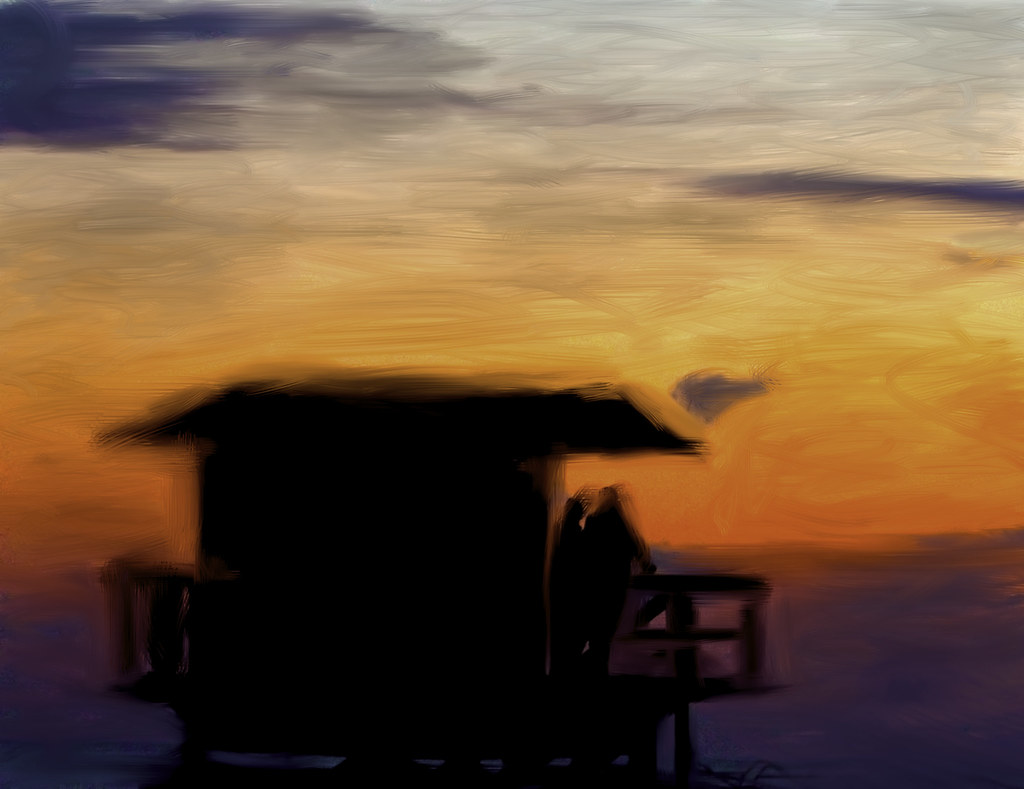
Adobe Photoshop CS5 Boldly Empowers the Digital Artist
So I’ve been playing around with Adobe’s lateset version of Photoshop that will be coming out in the next month, CS5, and I have to say that I think it represents a bold, dramatic and fundamental shift in digital art creation. I’ve been using Photoshop for many years now but this version has blown me away like none that I’ve ever seen.
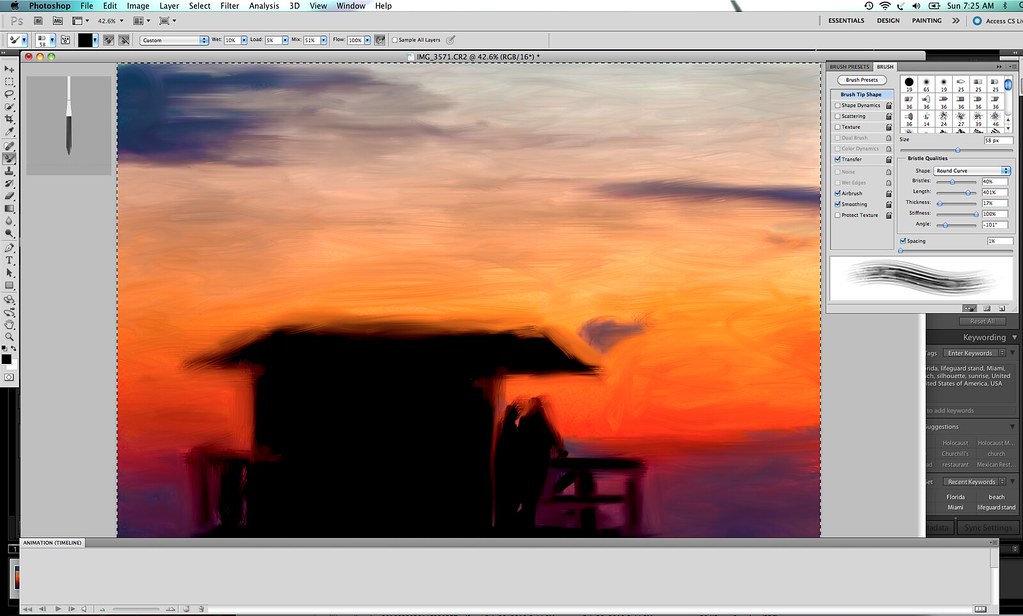
The new version has lots of cool new toys and tools for photographers, which I’ll get into, but for me by far the most significant achievement in this new version is that it has for the first time made painting available to the photographer.
I’ve wanted to paint for years, but have never had the talent with a physical paint brush. I’ve tried various software solutions to paint digitally and never have they done what I want. Usually painting effects in digital imaging software come out more as cheesy filters, routinely and uniformly applied over an entire image, resulting in something that feels more like a faux painting than a painting. But with Photoshop CS5’s new painting module, you have a new unprecedented amount of control over painting and brushes and can manually now paint over a photograph and turn it into the most realistic version of an actual painting I’ve ever seen.
I can’t wait to see what people end up doing with the painting module in the new Photoshop. Yesterday I uploaded my first “painting” to Flickr (above). It’s very crude and rough and I only spent about 10 minutes on it, but I think you get the idea with what is possible. I’m really looking forward to trying to replicate more photorealism with some of my neon sign photographs especially. The other two images in this post of the reclining nude and neon Kodak sign are also paintings made from photographs of mine.
So more than anything the painting tools and their total realistic representation blew me away in Photoshop CS5. I’m impressed big time. I was so impressed with that new feature that I hardly had time to really dig into more of the new tools for the photographer.
So what else is new for the photographer in CS5?
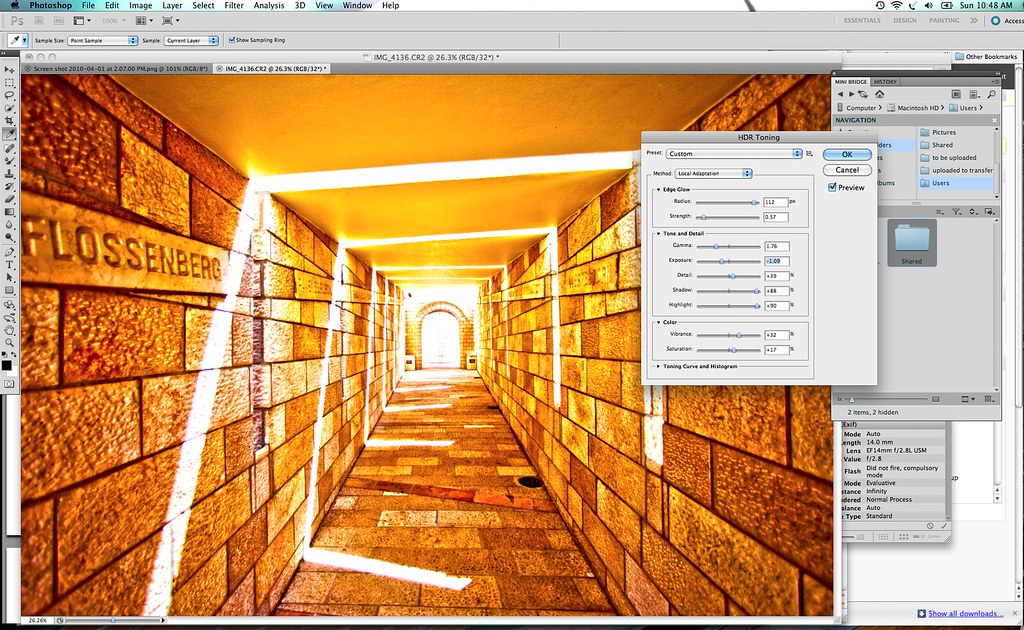
1. HDR, HDR, HDR. Now I’m not really an HDR photographer (yet), but Photoshop CS5 has new HDR functionality allowing you to combine multiple exposures to create hyper-realistic photos. Now I’ve tried HDR before in both Photoshop as well as other software packages and could never really get the hang of it. It seemed super hard to work with. It feels much easier in Photoshop CS5. CS5 also brings you the ability to create a HDR like photo from a single photograph rather than multiple exposures by using HDR Toning which mimics the HDR look in photos.
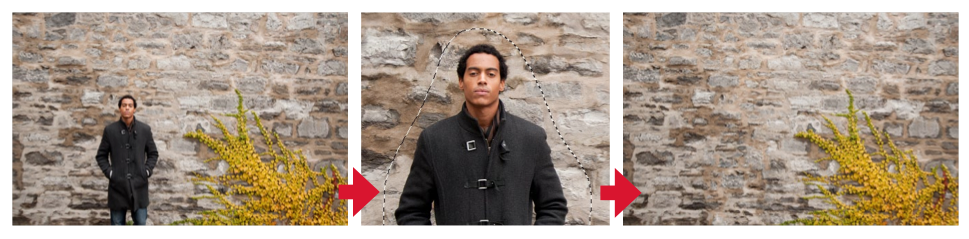
2. Much cleaner removal of unwanted elements in your photos. In the past if I wanted to remove something from a photo it was very difficult. Painstaking. It was tough with the tools to get all of the nuance of color around an image, the little halo left behind, etc. Now Photoshop has what they call “content-aware fill options”.
Basically when you remove something it automatically analyzes the surrounding area to replace perfectly what was around that content. It looks at the lighting, tone, sharpness, and essentially dynamically rebuilds what should have been there. It can even handle complex patterns where someone is standing in front of something like a wall or something with an intricate design. Adobe showed me an example where they actually remove a guy from in front of a wall. You’d never have known he was ever there.
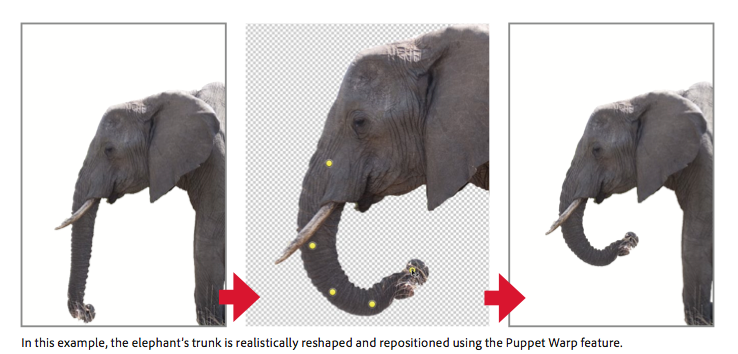
3. Puppet Wrap. Because you are the puppet master, right? It’s hard for me to explain puppet wrap exactly. But basically you can reshape objects in a frame, actually recompose a subject. See Adobe’s example of the elephant’s trunk.
4. Automatic lens correction. I don’t really use this, but the new Photoshop can now correct lens distortion better, correcting the three most common lens-based errors: geometric distortion, chromatic aberration, and vignetting.
5. Along with Photoshop CS5 comes the new camera RAW 6 plug in. This is the same camera RAW plug in that is presently being tested with the Lightroom 3, beta 2. Most significantly, Adobe has taken noise reduction to a new level with Camera RAW 6. I am amazed at how effortlessly and easily Adobe removes the noise from even the highest shot ISO images. Of all the things I’ve been playing around with in the Lightroom beta right now, this is by far the most significant improvement for me personally.
My only gripe about the noise reduction capabilities in the new camera RAW is that the results of your noise reduction (and sharpening) are only visible if you view at actual size 1:1. I wish that Adobe would render full sized view options with the actual results of noise reduction and sharpening instead of making you have to zoom in all the time — at least this is the case in Lightroom 3 Beta 2.
6. Adobe added a new mini bridge module for Photoshop. Now you no longer have to switch back and forth between Bridge and Photoshop to look at your photos from an organizational standpoint. Simply use the mini-bridge view from within Photoshop.
It should be noted that with Photoshop CS5 Adobe also introduced over three dozen new little productivity saving changes, features, shortcuts, etc. There are new features like cropping with a rule of thirds overlay, one click straightening, the ability to do better and easier conversions from color to black and white with tints to get tinted monochrome images and others.
Adobe also introduced some new tools to build 3D graphics with Photoshop. I can’t imagine using these personally, but if you do create graphics, this will be a nice new tool as well.
As always, you can easily use Lightroom as your first pass photo application and then use the Photo > Edit In > menu in Lightroom to bring the adjusted photo right into Photoshop to do your final finishing on it where wanted/needed.
Overall I’m *extremely impressed with the new version of Photoshop. While I do 95% of my processing of my images in Lightroom and usually only go into Photoshop for touching things up, it still is a must have application for my own workflow. More significantly going forward though, I will definitely be using Photoshop *much* more to keep up with my new hobby of painting my photographs. I’m also looking forward to exploring HDR a bit more and all of the other improvements that the new Photoshop brings to the table.
Hats off to the Photoshop team on the best version of Photoshop yet!
Stephen Shankland also reviewed the new Photoshop CS5 for CNET here and Adobe Featured Blogs here.


"This is a New Day" is really great – vibrant colours, and the painted effect doesn't look cheesy at all. Would definitely hang it on my wall…

This comment was originally posted on Google Buzz.
Nice! I've never used Photoshop (too expensive to justify purchasing it here in NZ) but those effects look fun.

This comment was originally posted on Google Buzz.
I've used most every version of Photoshop over the past 20 years. The ability to paint now with Photoshop is a huge leap from all previous versions. I'm really looking forward to how artists and illustrators end up using these new tools in CS5.
I know that I will likely spend a considerable amount of time in the next few years painting many of my own photographs.

This comment was originally posted on Google Buzz.
The painting stuff looks great but I've always wondered about the economics of Photoshop. I looked online and the minimum price for PS is $699. Add stuff and it gets MUCH higher. How does this company stay in business when there are so many good free photo editors?

This comment was originally posted on Google Buzz.
Christopher, certainly the price is steep. And Photoshop is not for everyone. Lightroom probably represents better value for most photographers, but I think that for the professional market and the advanced amateur market, it's easy to justify spending the money on Photoshop.
It's sort of like why pay over $1,000 for L series lenses from Canon when the 50mm f/1.8 is under $100? Because L series lenses are worth it, I guess I'd say.
For my own work I'd say processing is about 50% of my photography and in camera is the other 50%. Certainly if I'll pay $3,000 for a camera and another $6,000 or so on lenses, Photoshop seems like a bargain to me. The money I make from selling photos far exceeds the amount I spend on gear and software so for me the economics easily work.
I agree though that for many others the price is steep and not easy to justify. But I don't think that CS Photoshop is really being marketed to the casual everyday user.

This comment was originally posted on Google Buzz.
I am really looking forward to the new version since I read the first thing about this content awaare fill. This will be aweseome!
Thanks for your nice and early report.
[...] Like many bloggers and photographers, I was invited to review the new version of Photoshop before it launched, but with my busy scheduled in the past few weeks, I did not get a chance to do it properly. Instead, I invite you to make a jump and read the initial thoughts of my buddy Thomas Hawk who did play with Photoshop CS5 and shared his initial thoughts about the pruduct here. [...]
Yea, my attitude towards Photoshop is that the retail cost of the software is the ~least~ you invest in that app to get anything useful out of it. The hours upon countless hours to get going in it far outweighs the price…if you do bother to learn a significant chunk of it, the cost isn't going to stop you.
On the other hand, that's not to say it isn't worth trying a free alternative like GIMP. I've been meaning to get into GIMP more and more, but of course as long as GIMP is playing catch-up and there're much-needed features in PS….

This comment was originally posted on Google Buzz.
[...] Adobe Photoshop CS5 Boldly Empowers the Digital Artist | Thomas … [...]
You think Adobe software is expensive. Try buying Engineering software. SolidWorks and ProEngineer cost about $5000 per seat with a yearly maintenance fee of over $1000! If you need additional modules for stress analysis, cable routing and advanced rendering, well that costs even more.

This comment was originally posted on Google Buzz.
I would agree with Thomas, that for most photographers, Lightroom is a much better value than Photoshop. You can do about 90%+ of your photo editing and manipulation in Lightroom. The only things I find myself going to Photoshop for anymore are, perspective correction, stitching multiple images and HDR. I suspect Lightroom will support all of those features in the future. Also, Lightroom is exponentially easier to learn to use than Photoshop.

This comment was originally posted on Google Buzz.
I've never found the courage to learn photoshop but reading you I will have to in the next months…

I am already exhausted !
This comment was originally posted on Google Buzz.
Wow, that content aware fill is an answer to prayer! It’s such a pain to remove items in Photoshop. Thanks for the update.
Such a Wow factor.. now start the workon the CS5…yeepy…
[...] The Camera Raw 6 plugin will now support over 275 models of cameras, great news for photographers who do a lot of editing in Photoshop. In addition to this, you’ll be able to use Puppet Warp, a feature that allows you to select certain parts of an image, and then move it around easily, with Photoshop adjusting the rest on the fly. You can find a good example of this here. [...]
[...] -Adobe Photoshop CS5 Boldly Empowers the Digital Artist [...]
[...] características: podemos ver a Terry White presentando algunas en el vídeo antes citado; Tomas Hawk habla en su blog de las nuevas características de pintado digital; la revista Digital Photography [...]
the same shitty UI..Lazy!
This Kool-aid should taste great. Can’t wait to partake!
Great post Thomas! Love the clean removal of an object from a complex background.
CS5 looks very good. It might be time for an upgrade from CS2.

This comment was originally posted on Google Buzz.
Great info. The future of photography will be greatly influenced by 3d and patch match technologies.

This comment was originally posted on Google Buzz.
I upgraded to cs4 a few months ago. There is a price !

This comment was originally posted on Google Buzz.
[...] happening with the way they have content aware tools. For a good look at Photoshop, head over to Thomas Hawk’s post. Flash Catalyst looks interesting too, but I’m not a big fan of Flash, so I probably [...]
looks very promising
waiting for it to use
@thomas hawk- great write-up, although i must say that the canon 50mm lens for $100 is a great little lens. super crisp, very fast, cheapened only by its plastic housing. all in all, a great one to get (maybe get 2 lol).

This comment was originally posted on Google Buzz.
I've had to get two. Dropped the first one…

This comment was originally posted on Google Buzz.
[...] O plugin Camera Raw 6 inclui suporte para mais de 275 modelos de câmeras, o que é uma boa notícia para os fotógrafos. Outro detalhe é que agora você poderá usar o Puppet Warp, um recurso que permite selecionar e mover facilmente uma parte da imagem enquanto o Photoshop faz os ajustes em tempo real. Uma demonstração deste recurso pode ser vista aqui. [...]
Are we going to start seeing the same kind of prejudices again that we saw when people started first moving to digital? By that I mean, people used to not consider digital "real" photography because you could potentially modify and change the image. Now with some of the new tools in Photoshop (specifically the element removal and puppet master) it will be very easy for someone to completely change the photo from the original.I certainly see the value, I just wonder if everyone will.

This comment was originally posted on Google Buzz.
Kenton, it certainly will make it easier for people to manipulate images. I suspect that as these tools get better and better, we will get more and more suspicious of photographs and the story that they tell. Probably will impact journalism and blogging more than art photography.
Cassius, nothing wrong with that lens. It's an amazing lens actually and unbelievable for the price. Still, I couldn't even begin to imagine not living with my 135 f/2 even though it costs more than a copy of Photoshop. No doubt there are some great cheap tools. But sometimes it's very easy to justify paying more for what you get.

This comment was originally posted on Google Buzz.
I am not sure when I’ll upgrade. The new features did not really blow my mind. ^^
[...] O plugin Camera Raw 6 inclui suporte para mais de 275 modelos de câmeras, o que é uma boa notícia para os fotógrafos. Outro detalhe é que agora você poderá usar o Puppet Warp, um recurso que permite selecionar e mover facilmente uma parte da imagem enquanto o Photoshop faz os ajustes em tempo real. Uma demonstração deste recurso pode ser vista aqui. [...]
@Kenton – As a model photographer, I've spent a lot of time thinking about this issue of what is a "real" photograph vs. a "manipulated" one. The conclusion I've come to after a long, hard think is that any photo is a "legit" photo provided that the photographer is plain about the result of any manipulation. This doesn't mean the photographer has to share the details of the process in most cases (so you don't get to learn the Dragan effect or Dave Hill's methods
).
Underlying my view is the notion that photography inherently manipulates every scene. From the choices the photographer makes about what to include or exclude in the frame, selective focus using aperture, etc, no image is a completely faithful view of a scene. Just with shutter speed alone, I can: show motion blur where you would perceive sharp detail, freeze a fast-moving subject where you would perceive a blur, and make the night sky look like day.
At the core of this discussion is: what does it mean for a depiction to be "faithful"? If I'm looking at a white object, my brain makes it seem white even if I'm under a colored light source (like incandescent). So if I custom white balance that scene, is that more faithful to my perception, or have I "faked" a neutral light source?
What about flash photography? The scene only appeared the way it's captured by flash for the briefest instant, certainly that's a drastic manipulation of what appeared before the photographer. On-camera flash yields a view that only a miner (with miner's headlamp) would be familiar with, yet I'd challenge you to find a forensics department that doesn't use it to create images that participate in a legal chain of evidence.
How should we regard black'n'white photography? And speaking of black'n'white, what if a given photographer's perception of the world actually is different? Should a photographer with red-green color blindness produce images that are consistent with his view of things, with those colors muted, or someone else's? If someone else's, whose?
You'll notice this entire line of thinking supersedes anything specific about image manipulation in a program like Photoshop, because at the end of the day it's not a discussion about tools, it's a discussion about intent. You can pick most any tool in Photoshop and I could probably contrive a use of that tool that would alter a given photo to make it more faithful to a scene by some standard. I don't see how we can judge tools directly, only how they're used. (Or, to put it succinctly: in the hands of a surgeon or a mass murderer, a scalpel is still just a scalpel.)

This comment was originally posted on Google Buzz.
I have been using the Adobe Creative Suite for 12 years now. Adobe is one of the slowest companies to innovate their products. I have rarely (if ever) in the past 12 years seen a new Adobe release and said to myself I HAVE to have the new version, it’s so much better.
They have millions of people that use their products everyday, and yet not one of them would tell you that they find Adobe an exciting company to watch and see how they improve their software. Because the truth is, they only make minor improvements. They think they can add on a couple Photoshop filters in 2 years, and wow the world with their new release. It’s pretty upsetting, because its 2010 and they can do so much more to innovate in this space.
I still use CS3, and it works OK. I just can’t believe its been two releases CS4, and now CS5 and I still don’t see any significant changes for me to want to upgrade.
When I view the what’s new tab for CS5 products, it seems more like maintenance changes. Something that I would except to see every 6 months from adobe. I mean the Puppet translator is cool, but 2 years later. Come on. There should be a whole lot more.
Some of the ‘new features’ are existing features that have simply been retought to be easier. Come on, a little more focus on the core apps would be nice.
Thoroughly disappointed with this new release. It just doesn’t FEEL worth the upgrade.
I'm just a total image whore. I just think people should make images look as good and as interesting as they possibly can using any and all tools at their disposal including cameras, lenses, software, lighting, whatever they can possibly find to make the images work better and better and look stronger and stronger. I know I do.
Publishing photos for journalistic purposes one should probably take more care that your images reflect some degree of reality or don't purposely misinterpret events. You have a credibility issue to deal with there because you're largely reporting. Everything else though, I say manipulate to your hearts content. The only limitation should be one's imagination.

This comment was originally posted on Google Buzz.
I agree with both of your comments Steven and Thomas. It is still cart a fine art after all and art gives you a pretty wide berth for making something your own. I just remember the debate and it was often just pointless. Journalism is certainly the area where it matters the most and we all basically have to assume that the people shooting and publishing those photos are honestly depicting the scene and/or check it out for ourselves.

This comment was originally posted on Google Buzz.
The main thrust of what I was getting at above is that it's hard to define the notion of "manipulation" independent of the context in which the photo is used. I'd argue that journalism images, images used for scientific purposes, artistic images, etc…they all have to be honest in certain specific ways if they're of any use to anyone.
In order to produce an honest piece of artistic photography, it may be necessary to manipulate that elephant's trunk using the Puppet Wrap filter. For myself, I've found that thinking through why I have the impulse to make certain manipulations has made me more confident in the kind of alterations I make because I've taken the time to understand clearly what I'm trying to convey, why, and how the process serves that end. This awareness has even, on occasion, pushed its way up my workflow, causing me to light something differently than I otherwise would, or choose a different perspective, whatever.
Like most people, what I first started using a camera I just shot pictures without thinking too deeply about it. Now I think about the intended uses before I release the shutter and ask questions like: what am I trying to say?, am I telling a purely visual story here, or is there some other point, etc?
Thinking through these issues led me down this path–I don't say it's the only right conclusion, of course, but I do think formulating a clear position on this stuff will lead nearly everyone somewhere good…

This comment was originally posted on Google Buzz.
[...] Has Adobe been totally left out in the cold by both Apple and Microsoft? Well, maybe Flash (for now) … but other new Adobe releases are garnering rave reviews [...]
Well the removal tool is insane now everyone will be a Photoshop Master
Thanks for the post
thats cool thanks adobe
Wow, thats so aweseome! Mindblowing aweseome, Woohoo aweseome!
CS5 is so aweseome. CS4 was a pile of crap, the worst software i have ever paid for. But, this is history! Adobe has learned so much from the CS4 desaster that this time they made a really aweseome aweseome
wicked aweseome software. With CS5 i will be so much more creative!
aweseome!
Hi, Download a photoshop here
[...] Blog del fotógrafo Thomas Hawk, donde nos muestra alguna de sus fotos que ha retocado con el nuevo Photoshop [...]
[...] through 2010-04-29: Produto genuíno da web ameaça hegemonia do NYTimes [Webmanario] Adobe Photoshop CS5 Boldly Empowers the Digital Artist [Thomas Hawk Digital Connection] iPad: para reinventar o jornalismo [Ondas na Rede] share [...]
[...] Adobe Photoshop CS5 Boldly Empowers the Digital Artist | Thomas … [...]
[...] Hawk’s excellent post about the new features of Photoshop [...]
[...] I think this is the most significant upgrade for Photoshop yet. You can read my review on the new software from a few weeks back here. [...]
Photoshop CS5 is definitely going to be worth the upgrade. I wasn’t so keen on CS4 and so I didn’t bother with it but this one has a lot of features that I’m looking forward to. If any of the readers here are interested, if you join NAPP – National Association of Photoshop Professionals, you get a substantial discount on Photoshop CS5. You can check out the details on my blog at:
http://www.sensoryescapeimages.com/blog/2010/5/2/get-a-discount-on-photoshop-cs5-or-photoshop-cs5-extended-by.html
That’s cool i also thanks to adobe, but i don’t have the latest version of photoshop how can i download, please help me..
[...] I think this is the most significant upgrade for Photoshop yet. You can read my review on the new software from a few weeks back here. [...]
[...] I think this is the most significant upgrade for Photoshop yet. You can read my review on the new software from a few weeks back here. [...]
[...] I think this is the most significant upgrade for Photoshop yet. You can read my review on the new software from a few weeks back here. [...]
Ben Heine is a famous illustrator, portraitist, caricaturist and photographer. His latest project caught everybody’s eye, which he describes as Digital Circlism Hope you will find it interesting.