Two Great New Photography Videos by Marc Silber

Marc Silber is out with two great new photographer video interviews.

The first video is a short one with pro photographer Chase Jarvis who talks about how important it is to just get out and take photos with your camera, no matter what your skill level and that it’s fine to simply shoot in program mode if you don’t know what you are doing. Too many people who take up digital photographer become intimidated by the complicated technology that sometimes comes along with the DSLR and photo processing world. Chase reminds us that far more important than any of the tech or nerd stuff is simply that you are out there with any camera framing images.

The second video interview is a longer one and is with Senior Surfing Magazine Staff Photographer Jeff Flindt. Jeff is credited with 20 surfing cover shots for various surfing magazines. Surf photography is a whole genre in itself and it’s great learning about how Jeff has succeeded in that arena.

Chase Jarvis Tip for Photographers: Don’t Nerd Out, Get out and Shoot! from SilberStudios.Tv on Vimeo.

Surfing Photographer Jeff Flindt Shoots the Curl from SilberStudios.Tv on Vimeo.

SF Muni’s Crappy Response to Photographer Harassment

"Sir, You Are Not Allowed To Take Pictures On Muni Property!!"
Sir, You Are Not Allowed to Take Pictures on Muni Property!! by What I’m Seeing.com

A few days ago I blogged about an incident of photographer harassment when SF Muni Fare Inspector #32 threatened my friend Plug1 that if he did not turn over his camera to him that he would be arrested. Subsequent to this incident, many other blogs and Bay Area sites reported on this issue as well including Boing Boing, CBS5’s Eye on Blogs, sfist, fecal face news, sfstreetsblog.org, the San Francisco Appeal, and Muni Diaries. After this incident both Plug1 and I received a response back from Judson True in the Press office of SF Muni when we requested an explanation from SF Muni.

Below is the response from Muni’s office:

“Dear Plug1—

Please accept my apologies for the delay in responding to your email below.

We have had internal discussions over the past few days on this topic and we have determined that photography is permitted on the Muni system, though our Fare Inspectors were performing as they believed was required of them in order to protect the safety of our customers and employees when they intervened with you and others. They will be re-trained moving forward and I will get our policy posted on our website soon.

If there are further clarifications of our policy in the coming weeks I will let you know.

Thank you for riding Muni.

Best,
Judson”

Judson forwarded this email response to me in response to my request for clarification on this issue. Judson’s response is also published over at Plug1’s blog.

Personally I think that this is a completely unsatisfactory and crappy response from SF Muni. SF Muni never apologizes to Plug1 (instead they try to cleverly apologize for the delay in responding instead in order to make it sort of sound like an apology when it isn’t one — how much do you want to bet that one of their lawyers drafted this one?).

Further, I believe that their statement that their fare inspector was performing as they believed they were required for customer and employee safety is clear and utter bull shit. There was no “safety” issue. Plug1 was no threat to anyone. If Plug1’s description of this encounter is accurate, this was simply the case of a rogue Muni Transit law enforcement agent who didn’t want his photo taken and who decided to use his position as a law enforcement agent to try and intimidate a muni customer and SF citizen. By threatening to arrest Plug1 if he did not provide his camera to the officer he abused his power entrusted to him. This is wrong and should not be tolerated.

Below is my response that I drafted a few hours ago back to Judson True. I also cc:d SF Muni’s Executive Director, Nathaniel Ford, Plug1 as well as a contact of mine at the ACLU.

“Hi Judson,

I’m still a little concerned over this incident. In your email you state: “though our Fare Inspectors were performing as they believed was required of them in order to protect the safety of our customers and employees when they intervened with you and others. ”

Why did they believe that they were required to stop this photography? How was the photographer in this case a threat to either customers or employees? Cameras don’t have bullets, nobody’s physical safety was threatened. The photographer in question was in no way impeding traffic.

Feels to me more like a photographer was bullied by a cop who made up a non-existent “safety” argument after the fact because they didn’t get away with the bullying. This sounds to me like a pretty weak excuse for a law enforcement official to demand to see a camera and a customer’s photos and to threaten arrest, pretty serious things.

While I applaud Muni’s steps for making your open photography policy clearer as well as the retraining involved, I’d still like to know more about what this officer and Muni felt the safety issue was in this case. I would also like to formally again request the identity of of Agent 32. He is a public sworn police officer, I believe that I am entitled to his name as I would be any public police officer involved in a public dispute and incident. I will likely publicize his name and other identifying information about him with regards to this incident if this issue is not resolved satisfactorily.

I think Muni should apologize to Plug1 not just for the delay in responding to the incident but for the incident itself. I think any “safety” issue needs to be clarified, and I think the officer involved ought to be disciplined for abusing his power as a law enforcement agent.

Please respond as soon as possible. I’ll be blogging more on this in the next few hours.”

Photography is not a crime and cops who treat it like it is should be disciplined.

Update: It may be that these agents are not in fact sworn law enforcement. It’s hard for me to tell but based on this Muni job description it appears that they may merely assist sworn law enforcement. I don’t think that this really changes anything in this case, but a distinction nonetheless.

Tenderloin National Forest Opens This Saturday In San Francisco’s Tenderloin District

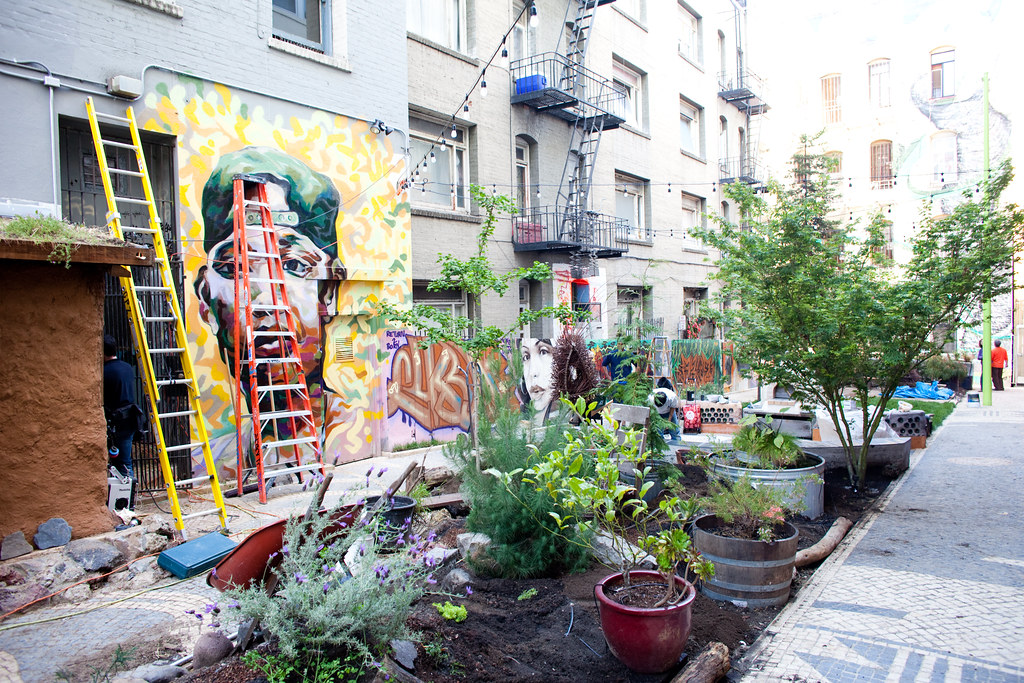
Getting the Tenderloin National Forest Ready for Saturday's Opening

Yesterday while wandering around and photographing San Francisco’s Tenderloin District I was surprised to see the gates to Cohen Alley off of Ellis Street open for the first time in as long as I can remember. Cohen Alley, which used to be one of the most filth, drug and crime infested alleys in one of the worst areas of San Francisco, has recently been renovated, reclaimed and renamed the Tenderloin National Forest complete with gardens and public art and the transformation has been nothing short of remarkable.

Tomorrow, the alley will officially open to the general public from 10am to 9pm with a day of celebration featuring numerous Bay Area artists and performers. According to the Tenderloin National Forest’s website, the public art and garden space was created to address the lack of green space in the Tenderloin. The Forest is intended to be an inspiration and model for others to attempt gardening in the inner city.

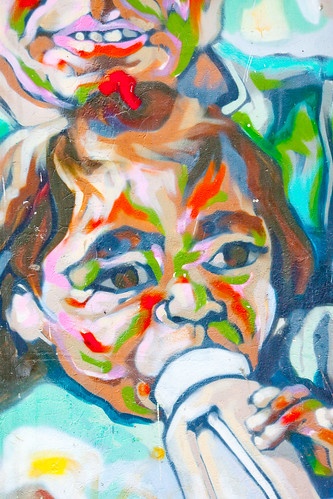
Mural, Tenderloin National Forest-2Darryl Smith, Plate 2The Poet, Tenderloin National Forest
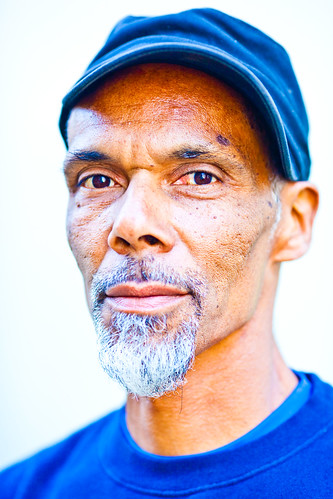
Darryl Smith, co-founder of the Tenderloin National Forest, along with two public murals from the garden.

From the Forest’s website: “The high concentration of apartment buildings in the Tenderloin gives it the densest population (people per square mile) in the city, and also the highest proportion of families and children. It is also one of the poorest, with a median family income of around $20K, a figure that is less half the overall city average. The area has a large number of immigrants from Asia, Southeast Asia and Latin America, and the 2004 demographic summary stated that the Tenderloin is home to the city’s entire Cambodian population.”

I spoke with one of the co-leading artists for this project Darryl Smith yesterday and he shared with me a number of the stories behind the art in the alley. There is a wonderful stone walkway in the alley created by Portuguese muralist Rigo, who has done several other large scale public installations in the City. There are some great murals there also done by Trust Your Struggle. In addition to lots of other public art works there is a fish pond and an oven to bake bread in the garden.

Smith told me that after Saturday’s opening the Forest would be open regularly from 12 noon to 5pm every weekday. If you get a chance definitely check it out. It’s an amazingly positive space happening in an otherwise pretty rough neighborhood. I’ve got a small set of images that I took of the alley yesterday here.

Smith also told me that two of the adjacent buildings to the alley provide community housing for low-income residents and added that one of the housing units will also include housing for an artist residency program where artists can live there and work at the National Forest and on projects for brief periods of time.

My Photography Workflow 2009

Last year I wrote a blog post detailing my photography workflow. Since last year though my workflow has changed a bit as I’ve migrated from Adobe’s Bridge software to Adobe’s Lightroom software and thought that I’d post an updated article detailing how I process my images from start to finish. Questions about my workflow are some of the most common questions I’m regularly asked.
A Thousand Miles1. Step One. Capture the Image. My current tools that I use to capture images include a Canon 5D Mark II camera and the following Canon lenses that I carry with me 24 hours a day / 7 days a week: 135mm f/2, 24mm f/1.4, 50 mm f/1.2, 14mm f/2.8, 100mm macro f/2.8. In addition to these five lenses I also carry with me my MacBook Pro, a high speed card reader, a back up 5D M2 battery and battery charger and three CF cards (a 16GB and 2 8GB, all SanDisk). I also carry daily with me Moo cards that I can hand out to people that I meet to point them to my photography.

On longer photo outings or weekend trips I will also bring with me a 120GB USB powered Maxtor hard drive, my Manfrotto tripod, my Canon cable release and usually my backup camera body, a Canon 5D.

I shoot every day. I try to take advantage of every minute I can to shoot. Sometimes this is 10 minutes of walking on my way to my office. Other times it’s 2 hour photowalks after work. Other times it’s an hour photowalk during a lunch break. Frequently it also involves more serious outings including out of town weekends to new destinations to shoot.

My iPhone also always goes with me and I especially use the mapping features on the phone to find and shoot new locations.

I use Flickr, Zooomr and Google Maps to constantly research things that I want to shoot. Neon signs, graffiti, landmarks, unique settings, etc. I have several local maps as well as maps for almost every state in the U.S. of things that I want to shoot there. Prior to going out on a shoot I’ll frequently assemble a list of the locations that I want to shoot and structure the order so that I can most efficiently drive or walk to various locations that I’d like to shoot. I use my iPhone to help get me around in places where I’m not 100% familiar with the area.
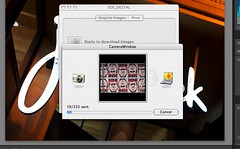
My Photography Workflow 2009, Plate 22. Step Two. Transfer the images to the computer. Most days my 32GB of CF storage is sufficient. For longer and more detailed shoots I’ll take breaks from shooting to manually transfer images from my cards to my MacBook Pro, freeing up the memory card for more shooting. Some days I’ll shoot as many as 2,000 frames which means a number of transfers from my cards (I always shoot in full quality RAW format) to my MacBook. Other days I may just have a few hundred frames to transfer. Pretty much daily though I’m transferring images from my cards to my computer. If you take a lot of photos like I do, do yourself a favor and invest in a high speed card reader. I use Canon’s proprietary software, Camera Window, to transfer my images to my computer. This software organizes my images into folders by date.
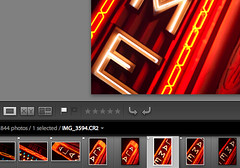
My Photography Workflow 20093. Step Three. Flag Images. My next step is to use Adobe Lightroom 2.3 to look at a day’s images. Here I go through a culling process where I use the flag tool to flag all of the images that I’d potentially like to process.

I don’t always end up processing 100% of what I flag, but mostly I’ll process these.

In general I’d say that I probably flag about 5-15% of the frames that I shoot.

My Photography Workflow 2009, Plate 34. Step Four. Develop images. Once the images for a day’s shoot are flagged I’ll use Lightroom’s “Develop” mode to make non-destructive adjustments to my RAW files in Lightroom. Typically I will alter the contrast, exposure, color temperature, brightness, fill lightening, blacks, clarity, vibrance and saturation. I’ll also use the vignette controls to create the optimal vignette (or reduce or eliminate natural vignette if need be). I’ll also use the spot removal tool to remove blemishes or dust from photos. I’ll burn and dodge typically as needed as well. This might sound like a lot of activity, but it actually happens very quickly. I’m trying to publish one million photos before I die, so I simply do not have time to spend a great deal of time on any single photo. Most photos are processed in 60 seconds or less.
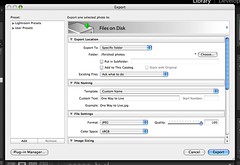
My Photography Workflow 2009, Plate 55. Step Five. Export JPG file. Once I’ve developed a photograph I’ll export a JPG version of it into a “finished photos” folder on my hard drive. I use the highest quality JPGs possible.

I also use this “finished photos” folder as my screensaver on my Mac. That way I can periodically see the most recent photos I’m working on as well as see any small blemishes big screen that I might have missed in the initial processing.

Sometimes I’ll go back in Photoshop and fix small blemishes or other things that I notice need work on my images during the day that they are playing in my screensaver on my Mac.
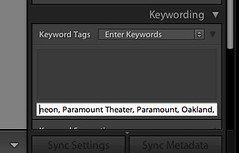
My Photography Workflow 2009, Plate 46. Step Six. Keywording. When I’m done processing a day’s photos, I’ll return to the library mode of Lightroom and synchronize the “finished photos” folder with Lightroom and begin keywording these images. I’ll almost always include the state and city an image is taken in, any reference to a particular organized photowalk or event or outing, and details to describe as best I can this image in keywords.

Keywords are very important for indexing your images for search on the internet and I could probably write a whole article about keywording alone. The key is to be as descriptive as possible and use any possible term that someone might use to search for the photo. If I take a photo of a painting at the Norton Simon Museum in Pasadena, for instance, it would likely be keyworded with “Norton Simon,” “Norton Simon Museum,” “museum,” “painting,” “Pasadena,” “California,” “Los Angeles,” as well as keywords of the artist, painting title, and anything in the painting itself “cow,” “farm,” “moon,” etc.

My Photography Workflow 2009, Plate 67. Step Seven. Geotagging. Once all of my images for a day are keyworded I’ll use Geotagger on the Mac to drag and drop my images using Google Earth in order to geotag them. If you are using a PC, Microsoft also has a free geotagging and keywording tool at their Pro Photo Tools page.

Geotagging my images at the file level (like keywording) means that I don’t have to geotag them on either Flickr or Zooomr. It ensures that I always retain this important data with my images both for search on my own computers as well as for search online.

Hot Donkey, There's a New Drobo Out! Welcome to Drobo 2.08. Step Eight. Archiving. Once a days photos are done, I will transfer the day’s RAW file folder onto my PC and on to a Drobo. I like to use Drobos because my images are then replicated across multiple drives protecting me in the event of a single drive failure.

I presently have four Drobos with about 10 terrabytes of storage. I will then take my finished JPG files and divide them into two categories “A” photos and “B” photos. I have another folder for A and B finished JPG files on one of my Drobos. At present I probably have about 20,000 finished photos that have not yet been published to the internet. About 20% of my finished photos end up in the “A” folder and 80% end up in the “B” folder.

I also periodically make sure that other copies of my finished photos are archived on hard drives off-site in case of theft or fire at my house.
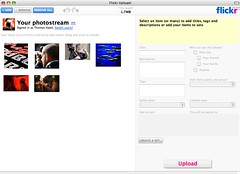
My Photography Workflow 2009, Plate 79. Step Nine. Publishing.
Typically I publish photos online 2x a day on weekdays and 3x a day on weekends. I will always select 5 of my “A” quality photos to upload in each batch. I will also include 12-17 “B” quality photos. I arrange my photos so that my “A” photos are the last 5 that I upload, with the photo that I like the very best from that batch being the very last photo that I upload.

Because Flickr and Zooomr typically favor your last 5 photos when sharing with your contacts, this ensures that most of my contacts will see my better images. Although I select 5 “A” photos and 12-17 “B” photos, there usually is no rhyme or reason to which photos are selected and this is largely a random process pulling from my archives. The only exception to this is when I shoot something that is timely like a party or an event in which case I’ll try to upload some of those photos as soon after the event as possible.

And that’s pretty much about it. I wrote this post by the way in response to a thread about other people’s workflow in the Deleteme Uncensored group where I am active on Flickr. You can read that thread here to see how other people manage their photos online.

Hey SF Muni Fare Inspector #32, Photography is Not a Crime

"Sir, You Are Not Allowed To Take Pictures On Muni Property!!"
Sir, You Are Not Allowed to Take Pictures on Muni Property!! by What I’m Seeing.com

It seems like day in and day out, increasingly, idiot cops and security guards continue to try and push photographers around. This most recent case is more personal to me because it hits close to home on the SF Muni and happened to a friend of mine Plug1.

Plug1 was doing his usual thing, which is documenting the hell out of daily SF life, when he was approached by an over-zealous muni transit fare cop, Fare Inspector #32.

From Plug1:

“Before I could get the 1st shot off, Fare Inspector #32 started marching towards me, hands in the air, yelling at me to STOP TAKING PICTURES!! So I put down away camera, walked towards him and answered his statement with a question. I asked him if he could cite me the specific Muni code that prohibited a Translink Card carrying passenger from taking pictures of Muni Personal on Muni Property. He could not. Instead he responded that I needed his permission and demanded to see my credentials and the pictures on my camera. He added that in fact, if I was unwilling to turn over possession of my camera to him he would seize my camera and have me arrested.”

Now first off. There is no prohibition against taking personal photographs anywhere publicly accessible in the Muni system. Public photography is allowed on both Muni and BART in the SF public transportation system. Secondly, no cop can ever make you delete images or seize your camera. Photography is a First Amendment right and they have no legal right to demand or do this. If Plug1 was arrested in this case, in fact, he’d have great material for a wrongful arrest case against SF Muni.

It sounds to me like this cop simply didn’t want his photo taken and decided to try and illegally bully Plug1 to get his way. This is an abuse of power. I hope Fare Inspector #32 is disciplined for this.

Now my own policy about shooting strangers is that if they ask me politely, 99% of the time I won’t shoot them or I’ll agree not to publish their image. In fact, over the years I’ve also taken down many images from my Flickrstream, blog, etc. when people have contacted me and asked me to take them down. On the other hand, when someone decides to be a prick about it, like this cop did, I’ll almost always publish their image and bring attention to the fact that they were being a pig — like Fare Inspector #32.

Somebody at Muni needs to inform Fare Inspector #32 that photography is in fact allowed within the muni system and that it’s an abuse of power for him to threaten paying customers with arrest over the crime of photography. Photography is not a crime.

How San Francisco Commuters Consume Media on Their Way to Work on BART

Sunrise BART

This morning I decided to conduct a very unscientific survey of BART riders from Oakland to San Francisco to see how they consume media on their morning commute. I boarded my usual 9 car BART train at MacArthur BART station in Oakland and exited at Embarcadero Station in San Francisco. During my commute I started at the back of the train and walked through about six full cars of the train and documented what each passenger was doing on the train.

I wanted to do this survey to get a rough idea of how much old media vs. new media was being consumed on my morning commute.

All in I surveyed 239 passengers in six cars. Most all of the passengers were sitting down in seats.

Below is a breakdown on how these 239 passengers were spending their time on BART this morning.

Doing Nothing 112 = 47%
Reading a newspaper 31 = 13%
Reading a book 31 = 13%
Using a mobile device 30 = 12%
Other 16 = 7%
Reading a Magazine 12 = 5%
Using a laptop computer 4 = 2%
Using a Kindle 2 = 1%

Personally I was surprised that so many of the people on BART were simply doing nothing (this included sleeping as well). In the other category was just random stuff generally not associated with consuming media. This included people doing paperwork, a few women putting on makeup, and one woman knitting. I suspect you’d find less people sleeping on an evening train home than in the morning train on the way to work.

I was also surprised at how few people were using laptops. I use a laptop almost every single day on the commute to process photos if I can get a seat. I was also surprised to only see 2 passengers using Kindles, given all of the hype that seems to be built around that device. In total, in fact, only 15% of passengers were using “new media” devices. This makes me think that old media publishing may in fact have a longer lifespan left than we’ve given them.

It should be noted that although a paid wifi service has been announced for BART, at present it is not in operation. In general I’m able to get an AT&T signal on my own iPhone on this commute about a third of the time while the commute is above ground. When the commute is in the tunnels below Oakland and below the San Francisco Bay there is no signal. I suspect new media devices could possibly go up if/when wifi is introduced. Then again, as it stands now, BARTs wifi plan seems really expensive and this may prohibit use.

One of the 30 people using a mobile device in my numbers was me as I was using my iPhone to tabulate what people were doing as I walked through the train.

Courtney B. Wilson, Your Photo Policy at the Baltimore & Ohio Railroad Museum Sucks

Sign at the B&O museum

Saw the photo to the left on Flickr today. It’s the posted photo policy of the Baltimore & Ohio Railroad Museum’s Photography Policy which reads in part: “photographs are permitted for personal use only and are not to be published anywhere (including personal web sites) without the expressed written consent of the Museum. Professional photography is strictly prohibited without the written permission of the Chief or Senior Curators.”

Which is a really stupid photo policy for plenty of reasons. First off, this policy is entirely inconsistent with the stated “mission statement” of this non-profit museum. If you look at the musuem’s mission statement it reads that their mission is, in part, to: “preserve the physical legacy and experience of American railroading, and to interpret and present its history to the widest possible audience.”

Now, if you are really trying to present the history of this museum to the widest possible audience, then why prohibit users from posting images of the museum on the internet. If by the “widest possible audience” you mean people in other countries, etc. it would seem to me that posting images from this museum on the internet would be one way of sharing this. To tell visitors that they can take photos but not share photos of the museum online in non-commercial venues like blogs and flickr is in direct conflict with the museum’s stated mission statement.

What’s more, it’s a totally *stupid* policy that is entirely unenforceable. Here for instance is one such set of images taken from the B&O Museum online on Flickr. There are tons more on Flickr as well. Now what is the B&O Railroad Museum going to do about that? Are they going to go sue some flickr user? And sue them for what? They don’t own copyright to the locomotives in their collection.

It seems to me that this musuem’s policy is simply another example of a museum who lets some power hungry curator draft some totally daft policy that is both unenforceable and in direct conflict with it’s mission statement. Rather than trying to prohibit images from their museum from daring to show their presence on the super evil internet, The Baltimore & Ohio Railroad Museum should embrace non-commercial use of imagery from their museum and see if for what it could be, valuable PR towards encouraging people to come visit the museum. Unless their museum really does just totally suck that bad and they are afraid that if people see what it’s like online that they wouldn’t dare pay the price of admission.

Now I have no plans on going to Baltimore any time soon. But I tell you. If I tell you if/when I do ever visit Baltimore I’d either skip this museum entirely or possibly just go and then post my photos against they’re stated policy anyways.

Courtney B. Wilson is the director of this museum. If you think a museum that doesn’t allow you to post images of the museum online sucks, feel free to reach out to him. There’s a group forum thread on this topic at Flickr here.

In the meantime if you’d like to look at some photos of a train museum, check out my collection of images from the California State Railroad Museum in Sacramento. It’s a great museum that I’d highly recommend, with a much more sane photo policy.

Thanks, David!