Southwest Airlines and Their Stupid Check In Requirements

I’ve been a big fan of Southwest Airlines over years. I love their lower prices and that they let you pick your own seat on the plane. I also loved that they let you print out your own boarding pass 24 hours in advance of your flight so that you can save time when you check in at the airport… well, that was until today.

I’m sitting at the Oakland International Airport right now because when I tried to do my normal online check in earlier today I was told that I could not. Today when I logged in I got an error message telling me that *my* itinerary was not available for online check in. So I called Southwest to ask them about this. The person on the phone was unhelpful. She told me that she could give me no information on the situation and told me only that I would need to check in at the airport, that she was getting the same error message I was when she tried to look into my reservation. I asked to talk to a supervisor and was told that there was nobody there who could help me.

Finally she relented and gave me the customer service (a toll number) for Southwest Airlines in Dallas. I tried calling this number for about a half hour (it was busy most of the time). Finally I got through and after a wait on hold for a while another woman came on the phone who looked into my record as well.

She also told me that I couldn’t check in online and told me that she thought it might be security related. She could provide me no specific information on why I could not check in online beyond her opinion that it was “security” related. She did give me the telephone number to the TSA though.

So I paid my $4 on BART and another $3 for the airport shuttle and went out to the Oakland Airport. I waited in line at the Southwest ticket counter until it was my turn at the employee assisted ticket kiosk. Here I entered my flight confirmation number again and got an error message saying “additional ID required.” The agent asked to see my drivers license and then printed me out a boarding pass.

Now, so today I’ve wasted 3 hours or so $7 to get to the airport only to show my driver’s license to a lady behind a counter. Now tomorrow when I take my flight I’m going to have to show THE EXACT SAME F***ING DRIVERS LICENSE to the security agent when I pass through airport security. So why in the blazes does Southwest Airlines inconvenience me and make me come all the way down to the airport in order to get a boarding pass the day before my flight? I could of course have tried to do all this tomorrow, but then I’d end up packed into a middle seat with a horrible boarding pass for my flight to Nashville.

How is “security” enhanced by my having to show my drivers license today AND tomorrow? And is it worth inconveniencing customers to this degree for no real enhancement in security.

Thanks for nothing Southwest Airlines!
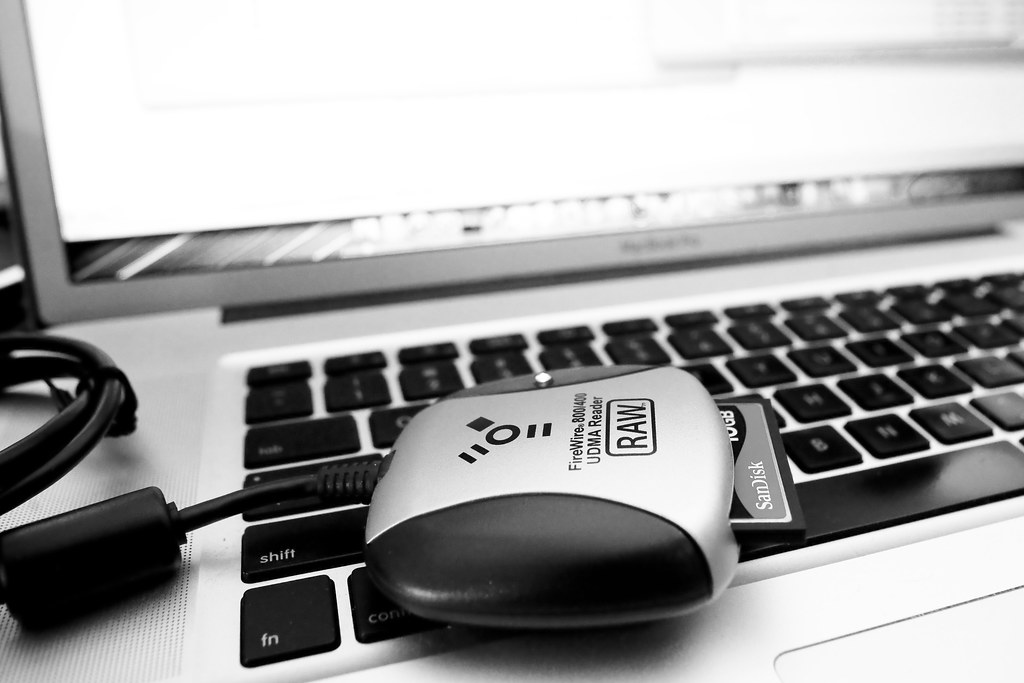
The Hoodman RAW FireWire 400/800 Compact Flash Card Reader is Built For Speed

I just bought Hoodman’s new FireWire RAW CF card reader and have to say it rocks. I’d been using a previous Hoodman RAW USB 2 reader for the past couple of years, and while faster than most other USB card readers I’d tried, the thing doesn’t hold a candle to this new FireWire reader.

For my first test of the reader it moved 90 full high res RAW files from my SanDisk card in less than a minute. The reader boasts download speeds of 42MB per second!

The Hoodman RAW 400/800 FireWire Compact Flash Card Reader is Built For Speed

As the megapixels (and files sizes) on digital cameras continue to get bigger and bigger and bigger (my Canon 5D M2 is up to 21 megapixel per frame now), getting these large images off of your camera faster and faster becomes more of a task.

Don’t be confused by Hoodman’s “RAW” moniker on this product. It’s just a name and the card handles both RAW and JPG format images. But they should probably rename this product simply to RAW SPEED. The reader comes with a standard FireWire 800 connection which is native on my MacBook Pro. It also has an adapter that comes with it if you need to use it with a FireWire 400 card. Of course, since you are all about speed though you’ll want to use that faster FireWire 800 connection.

No more waiting around while cards offload. This reader makes offloading your images a snap, getting you your empty cards back as quickly as possible to keep you shooting and shooting and shooting. The jump from USB to FireWire 800 speeds make this upgrade a pretty damn good one to make. I also find that frequently I’m using all of my USB 2 ports on my MacBook Pro and so I don’t have to unplug anything else to keep it going.

Best $80 I’ve spent in a long time.

Washington DC’s Capitol Visitor Center and Their Crappy “No Photography” Policy

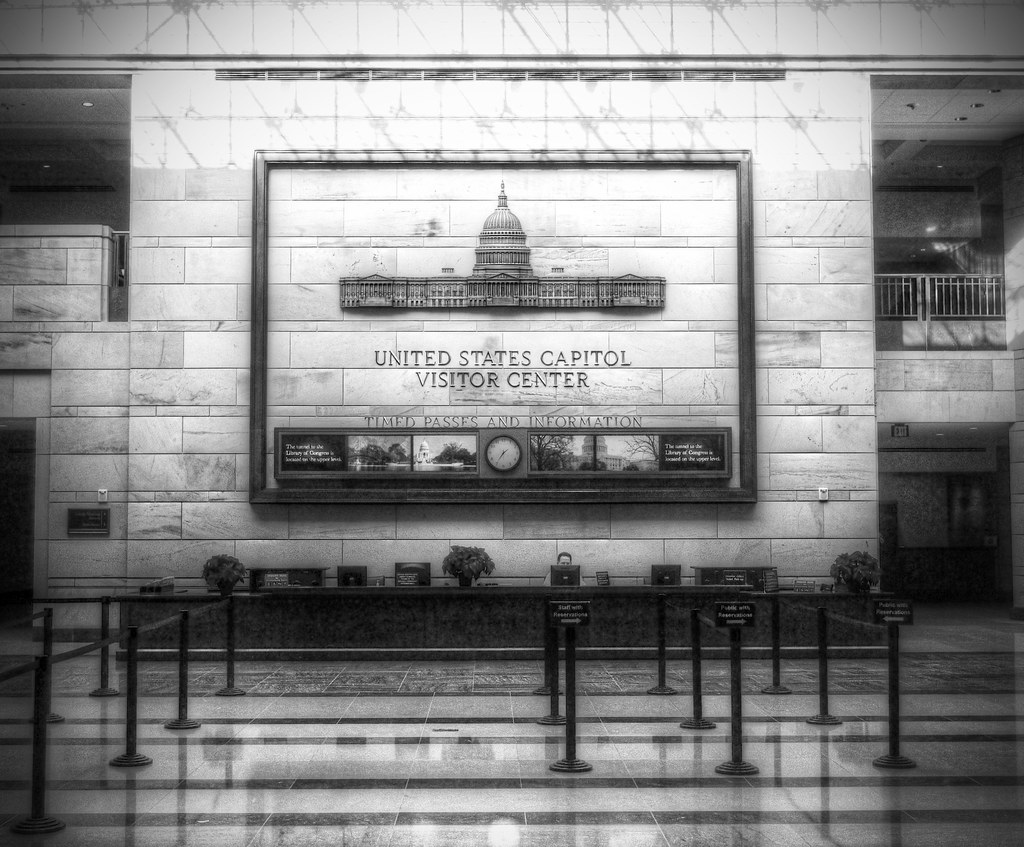
You can't take pictures in the Exhibition Hall of the Capitol Visitor Center
Front desk of U.S. Capitol’s Exhibition Hall photo by Andertho.

I was disappointed to see a post from my friend Andertho on Flickr this morning regarding a photography ban that is in place at the Exhibition Hall of the Capitol Vistor Center in Washington DC. Of all places that ought to allow photography, Government (remember that old “by the people, for the people thingy?) ought to be the most open of all. If New York’s Metropolitan Museum of Art, the NY MOMA, the Chicago Institute of Art, the Louvre, etc. can allow photography around their priceless works of art, certainly a museum owned by the Government (really by the people though) ought to allow it.

The new museum, which opened a little over a year ago, is taking a step backwards by instituting this ban on photography. In recent years many museums have in fact begun dropping their “no photography” policies, including the SF MOMA in San Francisco and just this past fall the Museum of Contemporary Art in Chicago.

From Andertho:

“At first I thought, “Well maybe they don’t want terrorists conducting a photo reconnaissance of the underground space beneath the Congress—that makes sense.” But no, the non-exhibit areas are fully photographable, as this photo attests.

So I looked on the Center’s website, and they said they ban photography in order to “protect the original documents that are on display.” OK, that makes some sense–just a little. There were a few original documents under glass in the expansive Exhibition area. However, being an avid D.C. photographer, I also know that the National Archives allows photography so long as you do not use a flash or a focus-assist light. I think that’s fair, and the National Archives has a few important documents on display, like, for example, the original Declaration of Independence and the Constitution of the United States of America. I’m pretty sure they have an original copy of the Magna Carta too. Yeah… I may have a picture of that somewhere. So, ummm… maybe if we can figure out how to take pictures around the Constitution, we can do the same thing around copies of laws passed under that Constitution?

So why no photography in the Exhibition Hall of the U.S. Capitol Visitor Center? I really don’t know—it does not make much sense, does it? It seems like pure bureaucracy doing what it does best—not caring about the very people it is there to serve.”

It is absurd to me that U.S. Capitol Visitor Center would cite the need to “protect the documents” as a reason for the ban. This reason is just pure BS to me. Certainly the documents housed in the U.S. Capitol Visitor Center are no more valuable or more likely to be damaged by a non-flash camera than all of the important paintings in the Louvre or well, the original U.S. Constitution and Declaration of Independence, both of which are allowed to be photographed.

Rather, this ban more likely is just another example of some little self important curator, putting their own proprietary need to rule their little kingdom by creating unnecessary rules and restricting who gets access to this collection and who does not. Oh and the desire to try and sell you overpriced books in their gift shop rather than letting you take your own photographs.

This is unfortunate and I hope the U.S. Capitol Visitor Center reconsiders this backwards policy.

Announcing the DMU Book: Save 10, The Lightbox Collection

Announcing the DMU Book:  Save 10, The Lightbox Collection

Last night the Deleteme Uncensored group on Flickr published our first group book together, Save 10, The Lightbox Collection. The 80 page 8×10 landscape format photography book features 75 photographic plates by 40 different DMU photographers. All of the photographs included in the book were voted by the group into the Lightbox and include a wide range of photographic subjects, genres and styles. Two of my own photographs are included in the book. This is the first time that I’ve published any of my own work in a book before.

The book is self published through Blurb publishing company. We are selling the book at cost to anyone who would like to buy a copy. Soft cover copies are $24.95 and hardcovers are $35.99 and $37.99 depending on whether or not you want a dust jacket cover or an image wrapped cover. You can see a preview of some of the pages of the book as well as order a copy of the book here.

This project was personally exciting for me to be involved in for a number of reasons. DMU is where I consider my home on Flickr. The photographs included in the group were first culled out by the group through the voting process and then further refined down to choices made by the photographers themselves. Most significantly though, I like the new democratic direction in general that fine art photography is taking with self publishing. 10 years ago an effort of this scope would have involved a large outlay of money up front in order to see the project completed. I’m also excited about being able to self publish future volumes of work like this in the future. This is the first volume of what I hope will be others to follow.

Thanks to all of the DMU photographers who participated in this book and a special thanks to Ivan Makarov, who did most of the work on putting the book together.