I Have a Hunch That Hunch Might Not Be For Me

I Have a Hunch That Hunch Might Not Be For Me

Hunch launched today. For those of you who missed it it’s the latest Web 2.0ish venture founded by Flickr co-founder Caterina Fake. With a pedigree like that it’s got to be good no?

I tried it out but didn’t get very far.

1. The first thing I tried was setting up a profile. I wish companies were not so restrictive on what they’ll allow in your profiles. Hunch is a lot more restrictive than Flickr in terms of what they will allow. To make things easy, I did what I normally do and just cut and pasted my existing Flickr profile into Hutch. Hutch first rejected it because I had more than 2,000 characters. So I edited it down to below 2,000 characters. Then it rejected it because it only allows basic letters, numbers and punctuation. So I took out the html code linking to my blog, flickr account, Twitter account, etc. Then it rejected it again even though at that point it only contained basic letters and punctuation less than 2,000 characters. Anyways, here’s my profile. Apparently I haven’t earned any banjos yet.

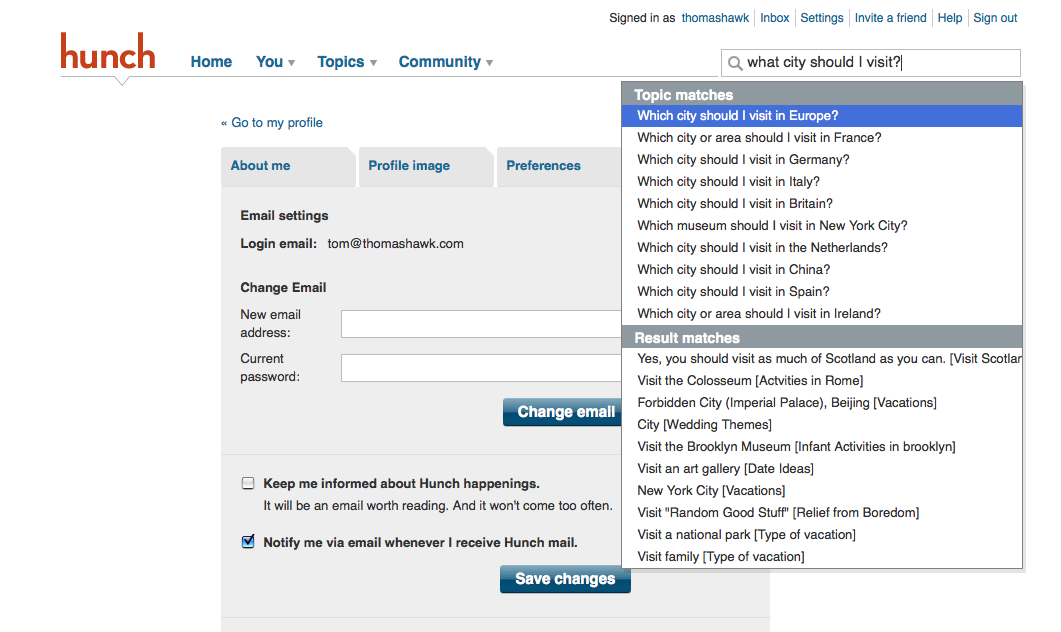
2. The next thing I tried to do with Hunch is ask it a question. I tried the first relevant question for me that came to mind. “Which city should I visit next to photograph neon in?” Unfortunately it appears that you can not actually ask Hunch questions that are not already in their system. Since only freaks like me would care about shooting neon in U.S. ciites, I doubt I’ll ever see that question in Hunch.

3. So I tried a broader more general question, simply, which city should I visit next? Unfortunately that question was a little too much for Hunch as well. Instead it offered me up opportunities to learn about what cities I should visit in Europe and China, but not in the U.S. Oh and it also offered me up which museums I should visit in New York City. I’m not sure if Hunch was saying I should go to New York to shoot neon, or if I should just go to New York. It did offer back the advice though that I should “visit as much of Scotland as I can.” I wonder what’s in Scotland? The world’s biggest neon sign?

I tried a few more of the premade Hunch questions. I tried the “should I upgrade to the new iPhone,” question and it told me no. (I’m upgrading on Friday anyways, my son dropped my wife’s iPhone in a glass of water and it doesn’t work anymore, but it didn’t ask me that question). I also asked it if I was more of a Mac or a PC person and it told me PC (unfortunately, my new Mac arrives later this week).

I don’t really see Hunch being very useful for me. Maybe in 10 years or so when they have more pages or if they hire some kick ass photographer who knows where all the best neon is hidden away in America, but not for now. TechCrunch calls it “beguilingly fun” though, so maybe I’m just not doing it right. Official Hunch blog announcement here.

Does Anyone Know How Windows Media Player Writes Your Star Ratings to Your Files?

How Does Windows Media Player Write Your Star Ratings

One of the things that I’ve been worrying about lately is all of the time that I spend rating music and how portable these ratings are. I’ve got over 100,000 mp3s at this point, most all of which I’ve ripped personally myself from CDs over the years, and for the past several years I’ve been using Microsoft’s Windows Media Player to rate these songs on a one to five star scale. Windows Media Player has an option that you can check under the library tab titled “maintain my star ratings as global ratings in files.” I have that option checked and have always assumed that as I rate songs in Windows Media Player that it is in fact actually doing what it is supposed to and actually writing these ratings to my mp3 files. And many of my songs in my music library do in fact have ratings associated with the files.

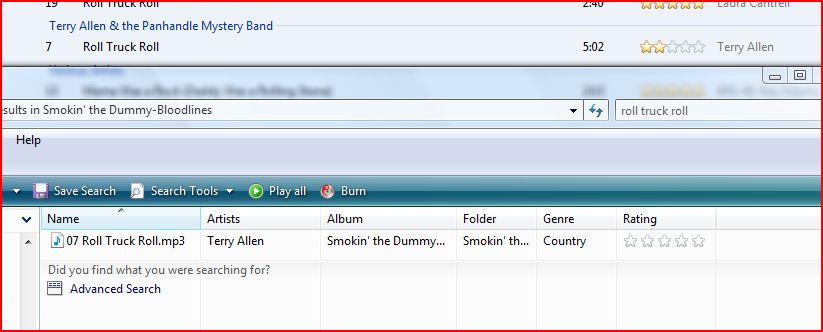
But lately I’ve been noticing that after I rate a song in Windows Media Player that if I actually go the the mp3 file itself it is not showing that same rating (see screenshot above which compares a song that I just rated in Windows Media Player with the rating shown vs. the same song in Windows explorer where it is showing no rating).

Now there could be a couple of reasons why this is happening. My first thought is that Windows Media Player does not in fact write a rating to a song file immediately. Maybe in order to improve performance it adds these ratings in batches later or when it updates your library. With my very large library maybe I just need to be patient and the rating will in fact show up in a day or two. But then again maybe my Windows Media Player library is corrupt (this actually has happened to me quite a bit and usually I know that it’s corrupted when Windows Media Player will no longer pull down meta data when I’m trying to rip new CDs).

My question is does anyone know exactly how Windows Media Player writes star ratings to your files? I actually like Windows Media Player enough to continue using it as my primary music player, but I’m worried that all of the time that I’m spending rating songs is in fact wasted time and it’s important to me that my song ratings are actually stored in my song files and not just in my windows media player library (especially since that library seems to frequently corrupt and I also want to be able to filter out my just my 5 star rated songs using Windows Explorer to copy them over to the smaller hard drive on my laptop).

Appreciate any insight from anyone who might understand how this actually works.

Update: Ok, I think I may have figured out how this works. Under the tools command is a menu item “Apply Media Information Changes.” I just ran this. The first time it hung at 0% processing giving me a server error for a long time so I googled around some more and saw that you can select to take WMP offline under the file command. After I did this and ran the “apply media information” command again, after about two hours it updated my ratings (or at least the rating on the test file I referenced above). So it seems that when you apply ratings to songs in WMP that they are just applied in the library until you apply the changes with the command to your files. Thanks by the way to Dave, who referenced this in the first comment as well.

Flickr to Overhaul Popular “Explore” Page, Will the Magic Donkey Be Shot in the Head?

Flickr to Overhaul Explore Page, Will the Magic Donkey Be Shot in the Head?

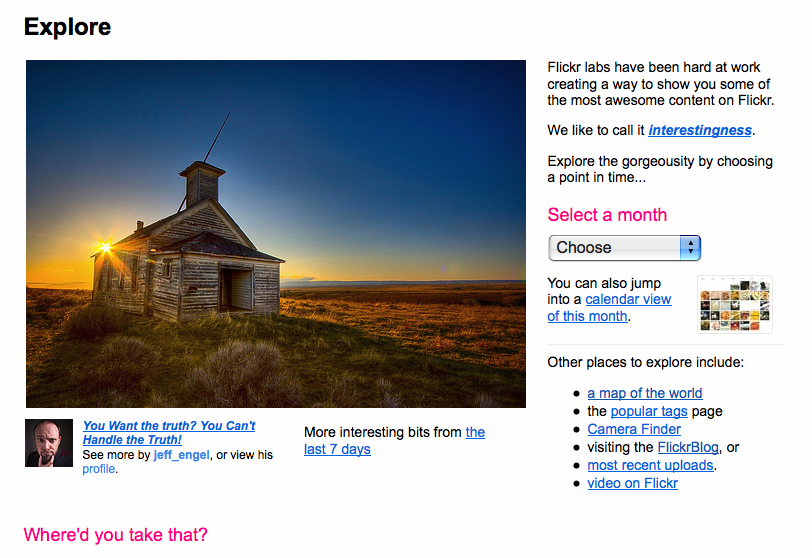
In a move sure to upset many long-standing flickr veterans as well as to possibly please many newer users, Flickr is currently in the process of a major overhaul to their popular Explore page where they showcase and feature 500 photos each day. The Explore page was started back in 2005 by Flickr as a place to showcase some of what Flickr considers, “the most awesome content on Flickr.” Flickr has continuously referred to a “magic donkey” at Flickr that selects the images that are included each day.

In actuality, an algorithm is used by Flickr to scour popular photos by their members each day and promote these photos on the site. The algorithm largely measures activity on individual photos including faves, comments, notes, tags, etc.

The Explore page on Flickr is a frequent topic of conversation among Flickr users as they’ve tried over the years to figure out the specifics of the algorithm due to the large amount of traffic that the page generally sends to individual Flickr image pages. Many users have complained recently that a small group of users have been exploiting the algorithm to gain a larger share of the traffic generated by this section of Flickr.

Flickr Community Manager Heather Champ announced this coming change on Flickr in a Flickr forum earlier this week. From Champ:

“I can see that we’re a community divided about the Top 500. Change is coming. Big change. I don’t have a firm date, but we need something that’s far more inclusive. Is there any way that 500 photos a day could capture the breadth and depth of this wonderful community? I think not.

So, for those who are fed up with Explore, please be patient. Don’t let the tired old broken down Donkey change you into something that you’re not. And for those who currently feel blessed by the golden light the donkey sends your way. Well, I’m sorry if the changes that come upset you in that you’re going to have to share your spotlight with many more people.”

I’m not going to close this topic, but I will if I come back and find out that you’re still slapping away at one another (a la Monty Python) with big fish.

One of the first major changes made to the Explore algorithm involved adding both averaging and randomizing components into the algorithm which upset many of Flickr’s most popular users at the time the change was implemented. Killing off the magic donkey may in fact significantly reduce the traffic on Flickr to many of their most popular users currently. I suspect that when whatever overhaul is rolled out it will potentially find many vocal critics depending on how this traffic is affected.

If you’d like to see if any of your own photos are currently featured on Flickr’s Explore page you can check that out at this link at Big Huge Labs here. If you’d like to see if any of your contacts or friends photos are featured there you can use this handy little script by Drew Meyers here.

Getty Images Revamps Flickr Collection Front Door and Builds Facebook and Blog Widgets

Getty Images Revamps Flickr Collection Front Door and Builds Facebook and Blog Widgets

Getty Images announced today that they have created a new front door for their Flickr Collection and that they have also added a “cloud” type imagery widget for Facebook pages and blogs. The new Flickr Collection front page features balls of rotating photos as built by contributors on the site. You can use the Getty Images site to build interesting clouds of 5 – 30 rotating images from the Flickr/Getty Collection and then Getty will make a cloud of these images. When you mouse over the cloud it rotates and speeds up and you can select any image to pull up a larger version of that image and get to the page where that photo is able to be licensed.

If you want to build a cloud of just your images, you need to search by the photo number of each of your photos that Getty has assigned and can add them one by one (up to the 30 photo max). To see what this looks like and feels like you can click through to a cloud of my images here.

Today the Facebook and blog widgets allow you to link to Getty clouds of the most recent clouds on their page, but in the next roll out of this widget they are going to allow you to just link the widget specifically to a single cloud of your choice. This would seem to me to be a smart way for Getty to extend their marketing reach through blogs, facebook and social media to bring more potential buyers to their site and a smart way for photographers to show off some of the work that they have for sell through Getty on their own pages.

To get to the widgets you can go to the main Flickr Getty front door homepage here and click on Explore. In the lower left hand part of the page is a menu item called “Inspiring Downloads,” where you can get these widgets. Here is also a direct link to the widget on Facebook.

There is also a new screensaver app that you can install that will use the most recent Getty clouds to your desktop.

Smoothdude Loves His Guacamole, Check Out His “Text to Movie” Review of Gloria’s Pushcart in Midtown Manhattan

My Pal Smoothdude made the above movie using xtranormal’s text to movie service. Apparently the free movie making site has been around for a while, but this is the first time I’ve heard of it. Looks like a fun way to make your own movies on for the web. I will say that adding guacamole for $1.50 does seem a little pricey for me, even in NY prices.

Kelly Castro’s Portarit of Me: TH 99

TH99

A few weeks back when I was down visiting with Adobe’s Lightroom Team, I had an opportunity to stop by and spend some time with Kelly Castro, an amazing photographer who I’ve long admired who works on the team. Kelly took the above portrait of me while I was down there as part of his Exteriors series. It was a honor to be photographed by someone with Kelly’s creativity and talent. Thanks Kelly for including me in this fantastic series. You can see more of Kelly’s work on Flickr here.

Flickr User Posts Comments Critical of Obama on the Official White House Photostream and Has His Comments Along With His Entire Flickrstream Deleted Without Warning

P060809PS-0350

If you don’t think that Flickr should delete accounts without warning and censor political speech digg this here.

I was dismayed today to read about the latest alleged case of Flickr Censorship. Censorship (or as they like to call it “moderation”) continues to be a problem on Flickr.

The most recent case is that of Flickr User Shepherd Johnson. According to Johnson on the evening of Wednesday June 3rd, he posted comments critical of President Obama on “8 or so” photos on the White House’s official Flickrstream. He said that he posted these comments because he was upset with the language that Obama chose to use in his recent Cairo speech regarding terrorism. Johnson said that two days later his comments had been scrubbed and deleted from the Flickr photos. Johnson shared with me the type of comment that he made and what he shared with me seemed appropriate and polite.

On Friday, June 5th, once again Johnson posted more comments on photos in the official White House Flickrstream. This time comments that were critical of the President’s recent decision to try and withhold photographs of detainee prison abuse.

From Johnson:

“Well, Friday it so happens is the day the Senate voted and passed the Graham/Lieberman bill called The Detainee Photographic Records Protection Act of 2009. Which allows the Obama administration to withhold from the public photos of horrible acts used by the Bush administration in it’s so called War on Terror. This to me was unacceptable. There are so few venues where the public can air grievances with our leaders and our government. This forum being the Official Whitehouse Photostream is an acceptable (I thought) place for me to make my comments known.”

Unfortunately for Johnson at about 11:00pm on June 05, 2009 when he tried to log on to his flickr account, he found that it was terminated without warning.

Again from Johnson:

“No explanation or anything. One second I was on and then I could not access my account. When I got back onto flickr using another account I went back to the Whitehouse site and all of my postings had been scrubbed. They were gone. I had about a years worth of work on that account and they just terminated my account with no warning. Some of the photos I had on the account had no back ups so they are now gone forever.”

You can see a cache of Johnson’s deleted Flickr account here. It was a paid Pro Flickr account with over 1,000 photographs in it.

It is interesting that Johnson was also using his Flickrstream to post additional photos that he had taken of government officials. Here is a flickr photo of his of his still intact from wikimedia of Fed Chairman Ben Bernanke leaving Bilderberg last year. In fact, if you look through the cached copy of his former Flickrstream you will see that a great deal of the photographs in his flickrstream were of political events, protests and politicians.

It is very unfortunate that Flickr would choose to take this course of action with one of their members. Freedom of Speech is an important thing and something that ought to be encouraged at Yahoo, not punished. Political speech especially ought to be give a very wide berth with regards to tolerance. It is even more eggregious given that this user was never even warned over the comments that he made, his account was simply irreversibly and permanently deleted. It is wrong for Flickr to do this. I’ve long argued that at a minimum Flickr ought to suspend offensive accounts temporarily (they could easily do this by simply making every photo in a user’s stream private) and allow an appeals process for grievances rather than simply acting with dictatorial power as a censor.

I contacted Yahoo regarding this latest censorship on their part and received back the following official response from their PR firm:

Flickr Statement:

In accordance with Flickr’s policy, we cannot disclose information to third parties concerning a member’s account. However, in joining Flickr, all of our members agree to abide by our Community Guidelines. These guidelines require that all of our members be respectful of the community and flag content that may not be suitable for “safe” viewing. Our members have always done a great job of identifying inappropriate and offensive content on Flickr and bringing it to our attention. We encourage all members to continue to make Flickr a safe place to share photos and videos.

Flickr is a very large community made up of many types of members from all over the world, and we respect the viewpoints and expressions of all of our members. In crafting the Community Guidelines, Flickr weighed the rights of the individual vs. the rights of the overall community, and built a system that would enable members to choose what they want to view. As with any community, online or off, there are members who may disregard the Community Guidelines. When this happens, Flickr may have to take action accordingly towards building a respectful community. For more information: http://www.flickr.com/guidelines.gne”

Update: In another forum here, Johnson has stated that he left a voicemail on Carol Bartz’s personal cell phone on the matter. He said after leaving this message that he had a returned phone call from Flickr Community Manager Heather Champ who told him that this account was deleted because he posted a photo of a prison detainee and because they accused him of “spamming” flickr. You can read the relevant forum thread here. Apparently another flickrstream where Johnson got the detainee photo was also deleted. Johnson is also stating that Heather told him that she did not know anything about the other deleted comments which may mean that they were actually deleted by the White House itself.

From Johnson: “She said that [edit: posting a detainee abuse photo] was part of the reason and the other part was that she claimed that I was spamming the forum, to which I asked her if she also gave warnings to the people who posted on twenty photographs the same “That’s my President Go bama!” type drivel over and over and over again. I also had her define the word “spam”, to which she could not. She seemed very careful to place her words correctly. We talked for about two hours. I think Carol really got under her skin. Carol apparently didn’t speak with her directly, she got the trickle down effect. Oh yeah, she offered me a $24.99 gift card for a new pro account but told me my precious photos and the hard work that I put in over the past year were irretrievable. I had over 53,000 views on that account. Some consolation.”

Update #2: More from Johnson: “Heather only mentioned that she deleted the comments concerning the Abu Ghraib photo, when I asked her about the original comment on the Obama Cairo Speech she had no idea what I was talking about. I crafted my dialogue with her to find out exactly what she knew and when she knew it. That means that somebody connected with the Whitehouse, one of Peter Souza’s staff or an intern, deleted my comments originally.

Update #3: See more on this story from the San Francisco Chronicle here and Gawker here, and the Silicon Valley Insider here, and Techmeme here, CNN here, BusinessWeek here, and the NY Post here, if you prefer Italian here.

Long Beach Security Officer Says She “Doesn’t Care About the Law” and City of Snohomish Settles for $8,000 with Photographer Over Wrongful Detention

The video above is a video from a Discarted.com altercation with a private security guard over a photographer’s right to shoot in public. This video was taken as part of a National Photographers Rights rally in the Port of Long Beach, a place where both security guards and police frequently harass photographers shooting in public. After telling the photographers that they are not allowed to photograph the refinery, the security agent proceeds to tell them that she “doesn’t care about the law.”

Apparently after this altercation, the real cops (Long Beach Harbor Patrol) were dispatched to the scene over a “physical altercation” (with another video forthcoming soon).

This is just another example of routine security guard harassment that takes place frequently with regards to photographers.

In another somewhat related piece, I was pleased today to read that The City of Snohomish has settled for $8,000 with a photographer after their police department unlawfully detained her for taking photographs of power lines. I was especially pleased to see the ACLUs involvement in this case and think that they are becoming a more and more significant ally in the fight for photographer’s rights. It may be that only when more and more of these cities are hit where it counts, in their pocketbooks, that this sort of harassing behavior stops. Thanks, for heads up on this case Adam!

Dude! I’m Getting a Mac!

Tower Above
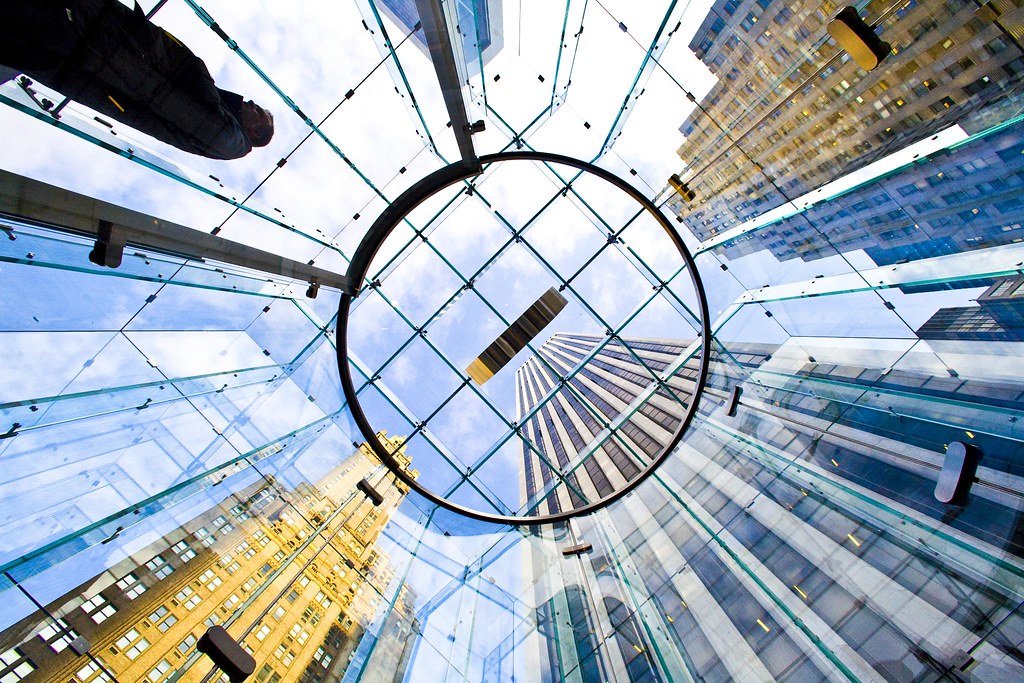
Apple’s Flagship Manhattan Store

Well after many years as a PC user, in August of 2006 I pulled the plug and switched from a Dell laptop to a 15” MacBook Pro. For the last three years I’ve been using this MacBook Pro as my primary computer. I was really worried about switching over back in 2006, but actually it was a lot more painless than I thought it would be.

As it’s going on 3 years now, lately I’ve been thinking that it’s time to upgrade to my next primary computer. I have a desktop Dell machine at home that handles my Media Center stuff and I’ve been going back and forth about whether or not to buy another MacBook Pro or go back to a PC for my primary laptop. The PCs seem a little bit less expensive, but overall I’ve been happy with my MacBook Pro experience. And I think a lot of times you get what you pay for.

Today’s decision by Apple to reduce the prices on the MacBook Pro (the base model on the 17” is now $2,499) combined with an increase in the standard hard drive size from 320GB to 500GB and an increase in the processor upgrade option speed from 2.93GHz to 3.06GHz finally pushed me over the edge and I pulled the trigger. Supposedly it will take 5-7 business days to ship me my new Mac (I really hope it gets here before I go to L.A. a week from Friday) but at this point it is ordered and on it’s way. Dude! I’m getting a Mac!

Here is the configuration on the new MacBook Pro I ordered:

3.06GHz Intel Core 2 Duo
4GB 1066MHz DDR3 SDRAM – 2X2GB
500GB Serial ATA Drive @ 7200 rpm
SuperDrive 8x (DVD±R DL/DVD±RW/CD-RW)
MacBook Pro 17-inch Hi-Resolution Antiglare Widescreen Display
Backlit Keyboard (English) / User’s Guide
Accessory Kit

So in addition to today’s price decrease on the MacBook Pro, here are the other reasons that I upgraded today and why I went with a Mac over a PC for the second time around.

1. Bigger hard drive. The current hard drive on my existing Mac is 120GB. Especially with larger file sizes from the Canon 5D Mark 2 space is at a premium. I do have a 320GB USB powered external Maxtor drive that I travel with, but it will be nice having that extra disc space, especially when going out in the field for long photo trips, for storing my images. Also, given that Adobe Lightroom seems to like a lot of scratch disc space for photo processing, having this room on the drive is going to be very helpful. My drive on my current MacBook Pro is 5400 RPM, I ordered a 7200 RPM drive on the new MacBook Pro, so hopefully this will help with Lightroom’s performance as well.

2. Increased processor speed. I’m hopeful that I will get a significant performance boost out of Adobe Lightroom (my most important software) with the faster processor on the new MacBook Pro.

3. The antiglare screen rocks. Frequently I’m processing photos on BART or in a lighted room at home or work and the glare on my current MacBook Pro makes it very difficult. I went into the Apple store and checked out the antiglare screen in person vs. the standard display and for me at least the decision to upgrade to the antiglare screen made all the difference in the world. Check it out at the Apple Store sometime yourself in person.

4. The 17” display looks amazing. Even though it is only a little bit larger than a 15”, the 17” display felt significantly larger to me when checking it out in person. The 17” is still small enough as well that it fits comfortably into my LowePro camera backpack that I use daily. Having the extra space will make it easier for me to process photos on it. The 17” MacBook Pro is one sexy beast. I couldn’t stop petting it when I’ve visited it on recent stops off at the Apple store.

5. I’ve been very happy with the support I’ve received at the Apple Stores. My hard drive went out on my MacBook Pro just a week or so before it’s warranty ran out and Apple replaced it free no problem. They’ve also been very helpful with the iPhone issues that I’ve had. I’ve needed to replace the headphones and they’ve done this free for me twice and also helped me figure out that a piece of lint was inside my headphone jack a few months back when I could only hear sound coming out of one speaker on my iPhone. I like the genius bar approach where I can set an appt and have someone experienced help me and I *love* that even when I have to wait I have access to fantastic Mac machines with super large displays at the store that I can surf the internet on while I wait. The free wifi in the stores is a cool thing too.

Knowing that a physical Apple Store is there if I have problems with my computer is a big plus in my opinion, especially one with such good service that I’ve consistently received at both the Emeryville and San Francisco stores.

6. More and faster memory. I’m hopeful that the 4GB 1066MHz DDR3 SDRAM that I’ll be getting will help improve performance over the slower 3GB (upgraded) memory in my current MacBook Pro today. It’s also nice knowing that I can upgrade this machine to 8 gigs when the price of the upgrade comes down a bit and that Snow Leopard should allow Lightroom to recognize all 8 GB of RAM.

7. It’s about time I got on Leopard. I never did upgrade my current Mac to Leopard. Apparently I’ll also be eligible for a $10 upgrade to Snow Leopard when it’s out on the new machine.

8. It’s about time I get my kids on a Mac full time. At home my kids use the two Dells that we have today. My old Dell laptop which is in the kitchen and the Media Center Dell in the attic. Even with these two other computers available though they are constantly jockeying for my Mac. Especially my older son Jackson (who is 8 now) seems to always want to be on it. He’s going to be thrilled to be able to have more access to my current Mac.

9. Longer battery time. Much to do has been made about the new and improved battery time with the new MacBook Pros. It will be nice having more battery time, especially because I use so many battery intensive programs like Lightroom. My biggest complaint about my current 15” MacBook Pro has been the battery life.

So there you have it. The new Mac is on it’s way. More to report when it actually shows up! I’m excited.