Archive for August 2011

My Photography Workflow 2011

My Photography Workflow 2011

Probably the number one question I get from people (after which camera should I buy) is “what is your workflow?” For the past two years I’ve published three different articles on my workflow, 2008, 2009 and 2010. Because my workflow changes so much over time, I figured now would be as good a time as ever to update this post for 2011.

I process *alot* of images. I’m trying to publish 1,000,000 photos online before I die — because of this it is imperative that I am as efficient as I can possibly be with the time that I spend processing images. I’m sure I could do some things better/faster, but I’m pretty comfortable with my system right now which is as follows:

Step 1. Capture the Images. At present my daily set up includes the same Canon EOS 5D Mark II camera that I’ve been shooting with for a few years now and five Canon lenses. The 14mm f/2.8, the 24mm f/1.4, the 50mm f/1.2, the 100mm f/2.8 macro and my favorite lens the 135 f/2.

Step 2. Import the images. I’ve got a high speed Hoodman FW800 card reader and four SanDisk cards (8GB, 16GB, 32GB and 64GB). Usually I just let Adobe’s Lightroom 3 import my images from my cards. LR puts each day’s image into a folder properly labeled with that date, so if I’ve got more than one day’s shoot on a card LR will automatically put the images in the right folders by day. If I’m out shooting in the field and need to dump a card and don’t have as much time, I might manually create a date folder myself and simply drag and drop the files from my CF card to the folder on my 17 inch MacBook Pro. This gets the photos to my computer faster.

Step 3. Back up the images. As soon as is practical (and hopefully before I’ve reformatted my CF cards) I will either transfer a day’s photos from my MBP hard drive to a drobo, or I’ll make sure that I’ve run Time Machine on my MBP’s internal hard drive. My drobos have two primary folders, photos to be processed and photos already processed (aka archive). I keep my drobos in a fire proof safe that’s bolted to a cement floor. I also keep copies of my files offsite. I did start using cloud storage as well but cancelled Mozy when they raised their rates. I’ve looked at a couple of the other cloud storage solutions but haven’t really found anything that is compelling for me yet.

Whenever I travel to shoot I always make sure that I bring my Time Machine backup drive and run it each night on the photos that I’ve already shot on that trip.

Step 4. Reimport the images For the most part I try to process in the order that I’ve taken the photos in. Sometimes I’ll skip ahead to process one or two photos from a photowalk, or if an event (like the Oakland riots) is time sensitive. But most of my work is not time sensitive and so I’ll just take my oldest unprocessed day and begin working on it. Right now I’m pretty far behind on my processing. I’m working on images from a Nashville trip from January 2010.

When it’s time to work on new images, I’ll copy that folder for that day’s images from my drobo to my MacBook Pro hard drive. Immediately Time Machine begins backing it up. I process most of my images on a 27 inch Apple Cinema Display. It’s great to have that as a second monitor. Note, if you leave Google+ on one of the displays it’s hard to get any actual processing work done. ;)

I’ll import a day’s image into my current Lightroom catalog and begin work from there.

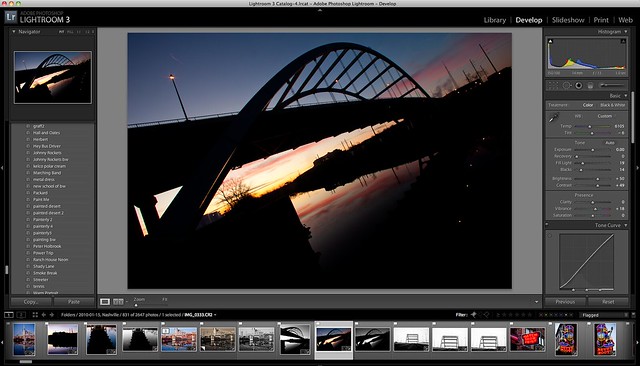
Step 5. Flag Images. The first thing I do with a folder’s images when imported into Lightroom is begin flagging the images that I’m going to want to process in Lightroom’s Library mode. How many images vs. frames that I process depends on the shoot. On some shoots I’ll process almost every image. On other shoots (like a sports event or runway models) I’ll way overshoot. In terms of the images for Nashville I’m working on right now, I’ve flagged 830 out of 2,646 photos for one of the days that I shot there.

Step 6. Process Images. Once I’ve flagged all of the images I want to process, I’ll filter by flag and begin one by one going through these images in Lightroom’s develop module. Each image is processed one by one by hand. I do have a ton of presets and sometimes I’ll use some fo these as jumping off points — many of these presets I’ve made myself, others I’ve found on the web, have been given by friends, etc. Most of the time though I don’t use presets and I just start tweaking the image using the various LR controls for what looks good to my eye and artistic sense.

I use most of the tools available to me. Frequently I crop images, boost contrast or vibrancy/saturation, increase blacks and fill lighting, use cloning tools to remove the horrible dust from the 5DM2 and definitely apply Lightroom 3′s killer noise reduction tech as needed.

Less than 3% of the time I’ll want to do something even more than what I can do in Lightroom and I’ll bring the image into Photoshop to do some work on it there. You have to be careful with Photoshop though because when you bring an image in there it’s not uncommon to look at your watch and realize you’ve been working on the same image for the past 2 hours. ;)

Sometimes if something really works in black and white I might bring it into Nik Software’s excellent Silver Efex Pro. The black and white conversion effects available in there are remarkable.

Step 7. Keyword. Once I’m done processing each of my flagged RAW images, I’ll begin keywording them. First I’ll apply the broad keywords that apply to everything (eg. United States, United States of America, USA, Tennessee, Nashville). Then I might select multiple images to keyword, (all of my neon shots, all of my bw shots, etc.). Finally I’ll go through each image one by one to add unique keywords (i.e. sunset, Tootsie’s Bar, guitar, graffiti, etc.).

Step 8. Title photos. I spend a great deal of time on my photo titles. For me each image conveys a message. Some titles are obvious and descriptive. Other titles are more personal to me. Titles can be meaningful or random. Alot of my titles come from music. Alot come from poetry. Most are just made up out of things coming from my head. In the meta data “title” field I’ll title each image.

Step 10. Save metadata. A quick cmd-s saves all of my keywords and titles to my photos once I’m done with this process.

Step 11. Export files. Once I’m done with my processing, keywording and titling I’ll export my RAW files as JPGs for online publication. I export at full resolution. I don’t use or apply any crappy watermark. These finished photos then go into a “to be uploaded” folder to be added to about another 20,000 images that are waiting to be published. I title the file titles descriptively (eg. Oakland, Jan 2010, street — note these are just the JPG file titles, the actual image titles are in the meta data).

Step 12. Save folder as a catalog. After I’m done with all this, I will save the folder as its own Lightroom catalog. I then move this catalog file into the folder with the RAW images itself. This way if I ever need to go back and process more from that day’s shoot, I’ll know exactly how I left things when I was working with those images from before. Once this is done I’ll copy the day’s folder into a new archive folder on a drobo and delete the folder from my MacBook Pro’s hard drive.

Step 13. Geotag. Usually I geotag if it’s easy. If I’m shooting all of my images in one place (like a comic book convention in Houston) I’ll simply select all of those exported JPG images and use the application Geotagger to write geotags to them. Geotagger works by me loading up Google Earth and then manually finding the spot I took the photo and then dragging the files over the Geotagger icon in my dock.

I always get people suggesting to me that I use an actual GPS unit (or even my phone) to do my geotagging instead. Basically it’s just not worth the hassle to me. I know it’s gotten easier over the years, but I have to believe that we’ll see in camera geotagging reasonably soon and I just haven’t wanted to invest the time, money, or energy in coming up with a solution here. I hate that with most solutions that I have to synch my DSLR’s clock up with a phone/GPS unit and that I’d have to deal with merging files later, afterwards.

Step 14. Upload. Each day I do two batch uploads to Flickr, 25 images in the morning, 25 images at night. These images are largely pulled randomly from around a 20,000 image bank of reserve photos I have. I’ve also selected about 7,000 of what I feel are my stronger images to upload to Google+. I upload more sparingly to Google+ uploading 5 images spread out during the day there. These are my primary two places that I publish my work online. I’ll also put up some images up on 500px as well, but not systematically like I do with Flickr/Google+. If a photo of mine gets a lot of +1′s on Google+ I might also publish that photo to my blog.

All He Could Say Was Yes — San Francisco, CA

All

Where Should We Drive Next? — Boston, MA

Where Should We Drive Next? -- Boston, MA

Top 10 Ways to Improve Google Photos

Top 10 Ways to Improve Google Photos

My friend Trey Ratcliff has an excellent post and poll going on over at Google+ right now asking photographers what their number one ideas are to improve Google Photos. Trey is meeting with the Google Photos team today and wanted to use his post to get ideas to share with the photos team as well as a rank how people feel about them.

What a great idea.

If you haven’t voted yet, hop on over to Trey’s post and check out some of the ideas and vote.

I’m amazed at how open to feedback the Google Photos team has been. It’s nice to see an active team engaged with the community that actually gets it.

Inspired by Trey’s post I thought I’d take a minute myself to put down what I feel are the top 10 ways to improve Google Photos. Some of these ideas are fanciful and would take a tremendous amount of work and some might be easier to implement.

I consider Google Photos largely a work in progress, but a work in progress with a very talented and dedicated team committed to innovation and I’m sure there will be great advancements by the team in the weeks, months, years ahead.

1. Stock Photography. Trey stayed at my place last week and we stayed up late one night doing a hangout and talked alot about the potential for stock photography with Google Photos. If the interent (and Google) are good at anything it’s disrupting inefficient businesses. This currently is the number one idea on Trey’s poll.

I’m currently enrolled in the Flickr/Getty stock photography deal (along with almost 30,000 other photographers if the number of members in the invite only Getty Contributors group are a measure). Here Getty keeps 80% of my photo sales and pays me 20%. That feels like too low of a payout to me. I’m not sure what the right payout should be, but I have a feeling that Google could do better.

The stock photography business is a big complicated complex business though. There are legal and licensing considerations that would scare off many who might like to get involved. I don’t have insight into the Flickr/Getty deal, but I’d guess that the reason why Flickr went with Getty rather than building something out themselves was because Getty has a good history of clearing images and also I’m guessing that Getty indemnified Yahoo over any liability associated with unauthorized image sales.

Google could acquire a smaller stock agency though with experience in clearing images and begin doing what Flickr is doing but with better payouts to photographers. The profit from this business itself wouldn’t be as important as the fact that having this opportunity to sell images would attract even more high quality Pros and advanced amateurs to Google Photos.

Stock photography is not a slam dunk though and Google would have many considerations. Could they protect themselves (and their deep pockets) legally from potential claims? How much money does Getty spend on advertising each year on Google? Certainly competing with them could threaten this advertising revenue. Google has been criticized already for being as fragmented as they are. Would stock photography be yet another distraction and yet another place to create competitors?

On the other hand, giving us a way to monetize our photos on Google Photos would be huge and certainly something that many high quality photographers would love to take advantage of. If anyone has the clout to compete in this world it would be Google.

2. Better album management including SmartSets. At present I’m dumping all of my photos into Google photos one at a time. I’m only using a single album, “Photos from Posts.” It looks really slick (with infinite scrolling!). I haven’t made any other albums because when I do it creates too much noise in my Google+ stream by dropping in tons of smaller sized duplicate photos anytime anyone makes a comment on a photo of mine that I put into an album.

The noise problem is one that Google should solve hopefully over time — but still, making albums is a manually intensive task at Google Photos today. You have to go to each photo one by one and literally copy it into a new album to create albums that overlap each other. This is very inefficient. First of all, actually copying new files when moving a photo to a new album is unnecessary. It’s duplicate storage and you don’t need to do this to better organize albums. And secondly it’s way too time consuming.

Instead Google should let us build albums by tags or keywords. I’d like to create an album of all of my San Francisco photos. Sets of sets or collections would be cool as well.

3. Interestingness by Circles. I know that technically Yahoo/Flickr have patented “interestingness,” but it seems absurd to me that this should prevent another company from sharing popular items.

What would be cool would be if I could view each of my circles by most popular items by day, week, month. I can’t always stay on top of everything and being able to go back and see the highest rated content from various circles would be slick.

4. Google Galleries. No, not online. I mean real, actual, physical Google Galleries. I think that there is a great opportunity for Google to sell fine art prints in a gallery setting. While a physical store is a big expense, I believe that merging digital art with physical art/prints in the physical world is ripe with opportunity. Initially Google would open a couple of smaller galleries in influential places, say San Francisco and New York. They would hire a curator to run the store. The stores would primarily be composed of plasmas rotating art for sale. Visually they would be stunning, clean, light, like an Apple store, with great big plasmas everywhere rotating the latest photos uploaded and cleared for sale by Google Photos. Every day the art would change.

There would be a cafe in the back that sold coffee drinks. This would invite the public in to browse the store and look at the art. There would be special terminals set up where you could search and browse for art by subject. You could, for instance, look specifically for a print to buy of a cable car in San Francisco, or of a cafe in Spain, or of an Amazon Rainforest, or of the Empire State Building — anything. You could search by artist, or subject, or whatever. Some prints could be done on demand – other prints could be done as limited editions being signed by an artist and shipped to you later.

Google Photographers could also hold shows and meetups at these galleries. Rather than me printing up a ton of my work, if I wanted to do a Thomas Hawk show, the plasmas could just rotate to all of my photos for a weekend. I could do an opening and have a show and sell prints much more economically. Google Photos could do meetups at the galleries and photowalks afterwards. How cool would it be if 100 photographers RSVPd for a Google Photos Meet Up where an hour before a photowalk the best photos from those exact 100 RSVPed rotated randomly on giant plasmas throughout the store.

Jen Bekman’s got a lot of great press with 20×200. Could this be a model? Maybe Google could consider her gallery as a jumping off point to partner with or help launch this?

Gallery photos could also be ordered online and shipped as real physical prints as well.

5. Photo Search. Right now one of the downsides of Google+ is that while your photos get a lot of attention when you first post them, they quickly fall off the radar and are buried for good. Google Photos needs a way to reignite long-term activity on these old photos. Search is where this starts. I need to be able to search for photos and then sort by interestingness or most recent. Photo search would drive activity to photos that are past their initial flurry in Google+.

Google should also consider giving great photos from Google Photos preferential placement in Google Image Search where appropriate. The social meta data around photos should give some insight into how strong a photo is. When someone is searching for images of the Golden Gate Bridge, why not send them to Google Photos Photographers with super strong images of the Golden Gate Bridge?

6. Recent Activity Page. Google’s notifications page is good, but it is not as good as Flickr’s Recent Activity page. This page really is the number one page on Flickr and should be the number one page on G+. There is no page there that is more important.

Google should study Flickr’s page and tear it apart every which way from Sunday. It’s quite literally the best and most addictive thing that Flickr does. We should have a customizable (we choose what to hide and see) recent activity page on Google+ that lets us know when people add us, when they make comments on our photos, when they mention us, when they +1 our photos, when they make a comment after a comment we’ve made (it’s very important to be able to hide this specific activity item especially on a one off basis).

Items should be bumped to the top as a new activity occurs on a post. This will make sure that we see a comment someone makes on a 2 week old photo of ours. The current Google+ notifications page feels too cluttered and noisy. Google’s got to get this page right. It’s important.

7. Photo Stats. Photographers love keeping track of the stats on their photos. This gets a little harder with Google+’s streams (what exactly is a photo view for instance?), but something here would be interesting.

8. Google Groups. I know groups are coming. Google bought Fridge afterall. But Groups are important to photographers. Groups have been very popular at flickr. Some thought should be given to how photo games can be created with groups. There are several flickr groups utilizing different voting games. DeleteMe style critique groups/games have been popular on flickr.

Groups on Google+ should have photo tools and even perhaps some built in voting interfaces. Mike Wiacek, a photographer who works for Google, has in fact built the voting interface for some of the voting groups on flickr on his own time. Mike would be a great guy to talk to about how some of these tools might be integrated by default into Google Photos voting games/groups.

9. Google Photo Books. Here Google could buy Blurb or another publisher, or they could try to build it themselves. Letting us create and sell photo books would be amazing. Print on demand is getting cheaper and cheaper and better and better. They could do magazines like HP’s MagCloud as well, but I think books are a better market.

10. Rebrand Picasa to Google Photos. Goole Photos is a much stronger name. This is already rumored in the works. Identity is important and Picasa has a bit of a reputation for being a sort of clunky 2nd best to Flickr.

Google Photos should recognize the goodwill associated with their name and rebrand everything photo related simply Google Photos. This should coincide with a clean up of Picasa’s interface (see smart sets above) and even more integration with Google+. There should be a link to photos in G+ for example that take you to a more traditional photo landing page for that photo simliar to a flickr photo landing page. This page should not be the same as the lightbox. The lighbox view is pretty perfect as is right now (although keywords should be included in the photo details section) and you should be able to +1 photos from this view and even with a simple keyboard command.

Bonus Improvement: Create a tie in between Google’s Reverse Image Search and our Google Photos accounts.

Although it’s not my bag, some photographers get really, really, really, really, really worked up when people use their photos online without their permission. Google’s new reverse image search shows you where your photos are appearing online. It would be cool if with a simple link next to one of your Google Photos you could conduct an image search showing where it shows up. Alot of people concerned about image theft would like this feature.

Photographers (maybe a Pro or Premium feature?) could also sign up for alerts to let them know when new instances of their photos were showing up online. These alerts could be dismissed one by one as much of the use might not concern people. But other unathorized use would concern people and Google’s already built a great reverse image search tool.

Where’s Banksy When You Really Need Him — Chicago, IL

Where's Banksy When You Really Need Him

Spins Free — Las Vegas, NV

Spins Free

It Was a Long Hot Summer — Houston, TX

It Was a Long, Hot Summer

Flickr is Dead

Screen shot 2011-08-12 at 1.39.46 AM

Poll:

Which one of these two albums looks better?

Flickr (the same view since 2004)

or

Google+ (with added infinite scrolling this week)

You know what? It doesn’t matter. It’s totally irrelevant. The Google one looks far better, but that’s so beside the point at this point.

Last night I realized for the first time that Flickr really was dead.

Where did this realization come from?

It had nothing to do with the fact that Google Photos is rolling out new innovation on a weekly basis while Flickr is still stuck in 2004. I realized it when I went to Trey Ratcliff’s photowalk at Stanford. There were over 200 people there. *200 people*! It was the largest photowalk I’ve ever been on and I’ve done dozens over the years. And what was everybody talking about at the photowalk?

Flickr?

No.

Google+?

Yes.

Not only was *everyone* talking about Google, there were tons of people from Google who were there at the walk.

Google Photos Community Manager Brian Rose was there (along with his sexy moustache). The Photo Team guy who built their lightbox Vincent Mo was there. Google+ Community Manager Natalie Villalobos was there (she used to work at Yahoo). Chris Chabot was there (and he was at Wednesday night’s photowalk in SF too). Mike Wiacek was there.

And these are just some of the people at Google that I know better than others.

There were so many more Googlers there as well. Lisa Bettany and Catherine Hall from TWIT Photos were there too.

I remember back when Flickr used to feel like this. Back when Stewart Butterfield used to show up at the SF Flickr Social meetups. Even though those were smaller meetups, they were full of the same high energy and spirit. Now the SF Flickr Group is basically dead. The meetups that used to happen every month don’t happen anymore. There are only three posts to the group in the past year and one of them is about reviving the group. I haven’t seen a Flickr employee in years. I’m still banned from their help forum for two years now — thanks alot guys.

Meanwhile I visited the Google Campus last week and got to spend an entire afternoon with an excited and engaged team who are full of energy and charged up about building the next great thing in photos.

Earlier this week, the Yahoo exec who is in charge of Flickr, Blake Irving, sent out an interesting tweet. He linked to an article that talked about the tipping point. The gist of the article was that when just 10 percent of the population holds an unshakable belief, their belief will always be adopted by the majority of the society.

While it would be easy to point to the fact that there are more photographers and photographs still on Flickr than the fledgling Google+, the fact of the matter is that the most resolved 10% have now moved on from Flickr to Google+. It will take time, maybe even a few years for the rest of them to follow, but follow they will. I’ve seen this movie before. I blogged the tipping point back in 2005 before Flickr overtook Webshots for the first time.

Webshots is still around of course, but they are entirely irrelevant at this point. Remember how excited we all were about flickr back then? Sort of like how we are about Google Photos now.

And like Flickr killed Webshots, Google+ will kill flickr.

When we look back 5 years from now at the downfall of Flickr there will probably be plenty of people to blame.

Was it simply ineffective Yahoo management? Were the execs too demoralized about underwater stock options?

Carol Bartz still doesn’t have a Flickr account. Meanwhile Sergey Brin posted shots earlier this week of some kick ass underwater photography from a trip of his to Egypt.

Was it all of the turnover, including the layoffs themselves in the flickr group and lack of any meaningful Yahoo investment?

Was it the rotating team leadership after Stewart the problem? Was it the attitude coming out of Community Management that photographers were more of a nuisance to put up with and talked down to than a community worth engaging?

Who knows.

But Flickr is very much dead in the water. It will take time to really see it happen, but they’ve lost the soul of photosharing. They’ve lost the spirit of photosharing — the zest and passion and love — and while they got away with that for a long time due to lack of competition, things have now changed with Google Photos arriving on the scene, and to a degree 500px as well.

I’m sure I’ll get a bunch of haters responding to this post. Flickr is still beloved by so many of us. Myself included. I still upload photos up there every single day. Don’t hate me for sharing this opinion. And don’t bash Google Photos for whatever features you think they lack compared to flickr — but, but, but, Google+ doesn’t have groups, blah, blah, blah.

All that’s coming.

As I mentioned before, it’s not about the features, it’s about the spirit. And with weekly innovation on their invite only beta product, Google+ is far more likely to get the final product right than Flickr is to innovate at this point.

Please keep in mind that this is just my personal observation after watching the photo sharing space very closely over a long period of years. I very well could be wrong.

Mark Twain’s famous quote “the reports of my death are greatly exaggerated,” in fact comes to mind.

Update: This post was on hacker news this morning and as such is getting a lot of traffic.

If any of you don’t have Google+ invites and want one, I’ve got 38 of my 150 left and you can get one here. First come, first serve.

The comments on this post on Google+ itself are also worth reading.

Update #2: Peter Adams got a great group photo from last night. He was shooting with a Phase One system which is pretty awesome. Check out his group photo here — be sure to actually click on the photo to see it huge in the lightbox view.

Update #3: My Google+ invite link ran out of invites above, but Mike Wiacek sent me his invite link which should be reloaded with another 143 or so if people still need them, just click here.

Update #4: Looks like Mike and I are both out of invites now. David Miller just emailed me his invite link. You should be able to get one here if you still need one until they run out.

Update #5: TechCrunch picks up on the Flickr story here. Looks like we’re out of invites again. Instead of me posting more links in the body of this post, if you have an invite link and want to share it, post it in the comments and people can use them there if they still need an invite to sign up.

They Don’t Love Me, They Only Know Me, When They Need Me

They Don't Love Me, They Only Know Me, When They Need Me

Why Google+ is Better Than Facebook for Photographers

I’m proud to say that I got on Google+ the very first day it was available for public beta (thank you again +Brian Rose). Since that day I’ve been an active user and have used it daily to publish my photography out to the the world. My Google+ workflow is pretty simple. I publish about 5 photos a day spread out over the course of the hours in a day that I’m awake. I’ve got a large archive of about 80,000 finished photos at this point so I’m posting what I feel is my stronger work there. Much of what I’m publishing on Google+ are first time photographs that I’ve never shared anywhere else. I don’t want to overwhelm people with my work, but 5 photos a day spread out over the course of a day feels about right to me. The reception has been amazing and I’m lucky to have quickly built an audience for my work.

In a little over a month I have over 38,000 people who have put me in their various circles — thank you. By contrast I have about 3,300 people who are my friends on Facebook. Despite the fact that I’ve been active on Facebook for almost 5 years, I have an audience over 10x bigger on Google+ than Facebook in a little over a month.

I believe that much of the reason why I and other photographers are having so much success on Google+ is because it is fundamentally a *better* platform than Facebook for photographs and in this blog post I’ll detail some of the key differences.

1. Google+’s photo thumbnails are MUCH bigger than the stingy microscopic photo thumbnails that Facebook gives you. I can’t overemphasize this point enough. Bigger is better when it comes to photography on the web. It boggles my mind why Facebook has insisted on holding on to their minuscule microscopic thumbnails as long as they have. They are tiny. You can’t see anything at all. Photos on Facebook are easily skipped and ignored. In contrast, Google+ gives us nice large thumbnails that invite you to interact. The photo thumbnails look sooooo better and as such they get much more attention. Super smart Google!

2. Google+ has the *best* lightbox on the web right now — by comparison Facebook’s looks cheap and dated. With Google+ when you see a bold new thumbnail by a photographer, you *want* to click through to see the large sized version — and when you do this you are rewarded by the best lightbox on the web. The photo is huge. It takes up just about the entire page except for some comments over on the right side. It’s loaded instantly — so fast. It never locks up or hangs like flickr.

Facebook by contrast, even with their revamped lightbox, only gives you a medium sized photo. The focus is not the image. Instead you see a bunch of gibberish in white under the image and even worse an advert.

3. With Google+ I can easily circle the photographers whose work I want to follow vs. Facebook’s clunky lists. Once I tried to play with Facebook’s lists to try to filter in some of my favorite photographers. It was a huge failure. I couldn’t figure it out. It was clunky. So I’m stuck with my main Facebook feed being full of non-photography related stuff. Sometimes I just want to see big bold photos instead of having to read about Aunt Edna’s latest recipe for avocado soufflé or 2nd cousin Gary’s passion for bashing the hell out of Sarah Palin 28 times a day, even after the election’s been over for 2 years now. With Google+ I can create great circles of people devoted to photography, with Facebook I can’t.

4. The Facebook/Flickr integration thing has been a huge disaster. When I first heard that you could import your Flickr photos into Facebook, I was sort of excited — but this has been one of the most poorly integrated features I’ve ever seen. Sometimes Facebook will import a thumbnail representing my Flickr photos *8* times in a row. Sometimes they won’t come in at all. When they do come in they use the worst photo for the thumbnail instead of the best (hint, last uploaded in a batch to Flickr, not first uploaded to Flickr in a batch).

And I’m not alone here: Just go to the Flickr Help forum and search “Facebook” and you’ll find post after post after post of people on Flickr complaining about how broken this process has been. Good God, there are over 1,700 posts in the Flickr Help Forum, almost all of them complaining about how broken the Facebook integration is. This has left a bad taste in my mouth re: photography on Facebook.

5. All the best photographers are showing up on Google+ and an exciting now community of photographers is blossoming. Photographers on Google+ are engaged. Every day people are sharing new lists of photographers and resharing content by their favorites. There are long discussions about techniques and methods. Photowalks are being set up. The photo community is alive and active on Google+ while it feels stale and non-existent on Facebook.

Photography is such an important part of any social network and Google+ has been optimized for photography and photographers right out of the gate. It feels central in how they’ve designed service. Google+ realizes how visual we all are and has built a far better platform for us to be visual with. Everybody loves photography right? It’s no surprise that photographers are doing so well on this exciting new platform.

If you’d like to follow my work on Google+ you can do that here.

If you haven’t signed up for Google+ yet and need an invitation you can get one from me here. (I’ve only got 129 left to hand out on this link).

You can read comments on this post over at Google+ here: https://plus.google.com/104987932455782713675/posts/8czBNGPWqEk